5 Best Akiflow Alternatives right now (Compared, with Real Pricing)


Akiflow is a very good app. I'll say that up front so nobody thinks this is a hit piece.

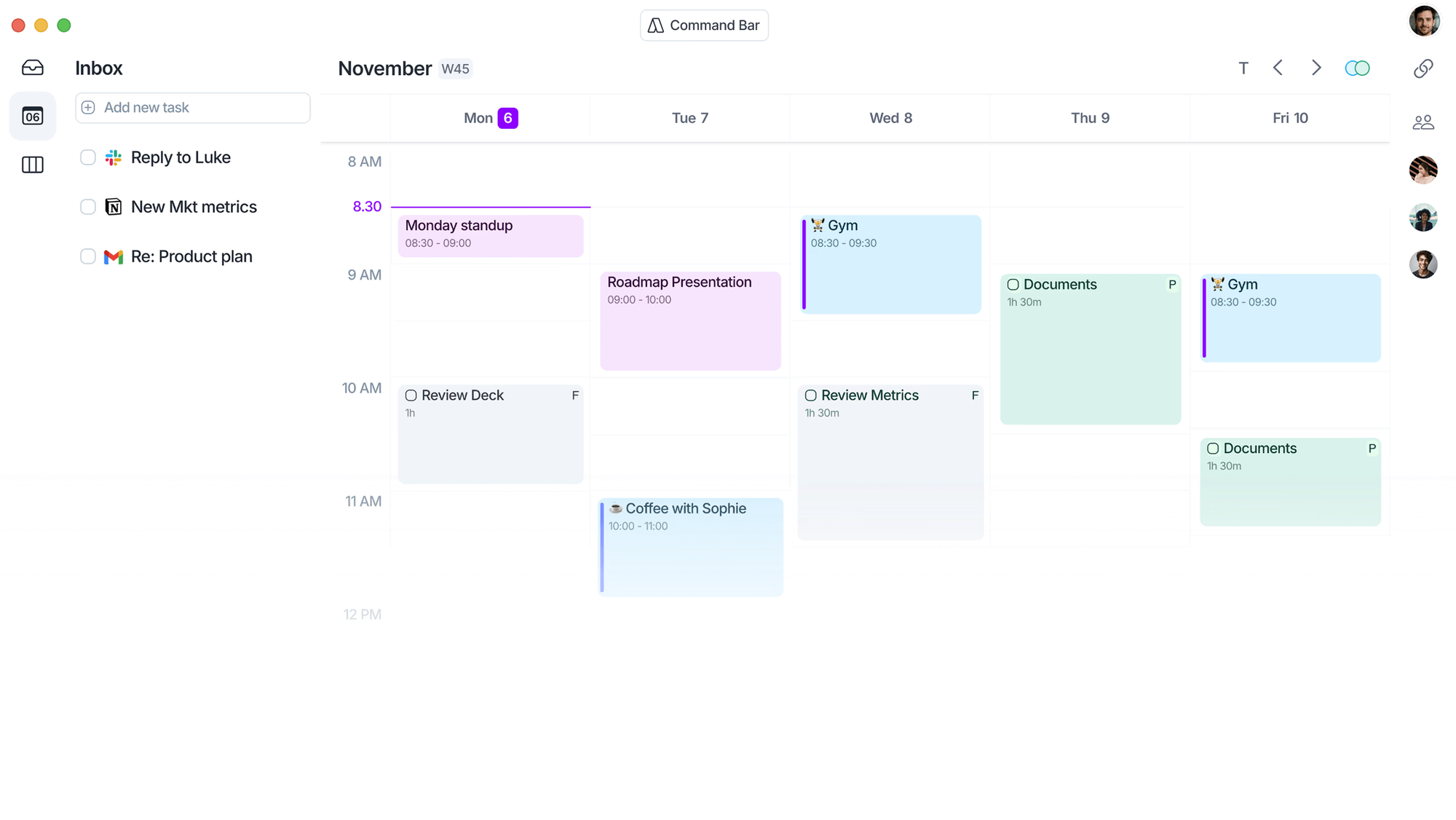
But $34 a month is a lot of money for a to-do list, even a fast one with a keyboard shortcut for everything. And after a few weeks, a lot of people hit the same wall I did: the inbox is beautifully organized, and I'm still the one dragging every single task onto the calendar. Every morning. By hand. 🙃
So I went looking for the best Akiflow alternatives. Some are cheaper. Some do the planning for you. One is basically free. Here's what I found, who each one fits, and how to switch without losing a week of your life to migration.
Quick answer: What are the best Akiflow alternatives?
If you only read one section, read this one.
- Saner.ai: best for people who dump thoughts, notes and emails in one place and want AI to turn them into a plan. Free plan, paid from $8/month.
- Sunsama: best for a calm, guided daily planning ritual. $17/month billed yearly.
- Motion: best if you want AI to schedule tasks onto your calendar automatically. From $19/month.
- Morgen: best Akiflow-style calendar + task hub with an AI planner. $15/month billed yearly.
- Reclaim.ai: best free option for protecting focus time and habits. Free plan; paid from $10/seat/month billed yearly.
Why people look for an Akiflow alternative
1. The price
Akiflow's pricing page lists Pro at $34/month billed monthly or $19/month billed yearly ($228 up front). There's no permanent free plan, just a 7-day trial, and it asks for a card. There are cheaper multi-year "Believer" plans, but committing to five years of any productivity app is a bold move. I can't commit to a brand of toothpaste for five years.
2. Manual time blocking
Akiflow's core loop is: capture everything into one inbox, then drag tasks onto your calendar. That's great if you enjoy planning. It's a chore if you don't.
3. You need more than tasks
Akiflow pulls tasks in from Gmail, Slack, Notion, Asana and friends. It's weaker as a place to think. If your real mess is notes, half-ideas and "I read something about this last Tuesday," a task inbox won't fix it. I covered this in more depth in the full Akiflow review.
4. Mobile
If you capture most tasks on your phone while walking the dog, test the mobile app of any alternative first.
How I judged these alternatives
I didn't rank by feature count. More features usually means more settings to ignore. I looked at five things:
- Capture speed. How fast does a random thought become a task?
- Planning effort. Do you plan the day, or does the AI?
- Calendar handling. Does it block time and adapt when plans change?
- Price for a solo user. Yearly and monthly.
- Stickiness. Would a normal person still use it in week six?
The 5 best Akiflow alternatives, reviewed
1. Saner.ai: best for turning messy thoughts into a plan
We've compared it head to head in Akiflow vs Saner.ai.
Akiflow starts from tasks. Saner.ai starts one step earlier, from the jumble in your head. You dump notes, voice memos, emails and links into one workspace, and the AI assistant pulls out the to-dos, suggests a plan for the day and puts things on your calendar. A note you wrote last week can come back as a scheduled task without you re-typing it.
What stands out:
- Notes, tasks and calendar in one place, so you're not bouncing between three apps
- Syncs with Google Drive, email, Slack and your calendar
- Chat with your own notes and files ("what did I promise Sarah about the Q4 deck?")
- Chrome extension and mobile app for capture
- Built with ADHD and executive-function struggles in mind, which shows in how little setup it asks for
Where it falls short:
- Not keyboard-first the way Akiflow is. If you live on shortcuts, you'll notice.
- Fewer deep integrations with dev tools like Jira and Linear
Pricing: Free plan (30 AI requests/month). Starter is $8/month, Standard is $16/month, and yearly billing knocks off 20%, per Saner.ai's pricing page.
Pick it if: your bottleneck is a brain that forgets things, not a calendar that needs arranging.
2. Sunsama: best for a calm daily planning ritual
Sunsama is the closest thing to Akiflow's philosophy, with a softer personality. It walks you through planning each morning: pull in tasks from your tools, estimate time, drag them onto the day, and it warns you when you've planned 11 hours of work into an 8-hour day.
What stands out:
- Guided daily and weekly planning and shutdown rituals
- Pulls tasks from Asana, Trello, Jira, Notion, Gmail and more
- Timeboxing on your calendar
- Encourages realistic workloads instead of heroic ones
Where it falls short:
- No free plan
- Planning is still mostly manual; the ritual is the product.
- No AI
- Not much cheaper than Akiflow on a monthly plan
Pricing: $22/month monthly or $17/month billed yearly, with a 14-day trial and no card required, according to Sunsama's pricing page.
Pick it if: you like Akiflow's control but want structure that nudges you to stop overcommitting. Already tried it and not sold? See our Sunsama alternatives.
3. Motion: best for fully automatic scheduling
Motion is the opposite of Akiflow. You don't drag anything. You add a task with a deadline, priority and duration, and Motion's AI slots it into your calendar. When a meeting runs long, it reshuffles everything else. It's a bit like having a slightly bossy assistant who never sleeps.
What stands out:
- Auto-scheduling and auto-rescheduling of tasks
- Projects, docs and meeting notes in the same app
- Strong for people juggling lots of deadlines
Where it falls short:
- You give up control. Some people hate the calendar moving under them.
- Setup takes real effort. Garbage estimates in, garbage schedule out.
- Can feel heavy for a solo user with simple needs
Pricing: Pro AI is listed at $19/seat/month, with roughly 33% off on yearly billing, on Motion's pricing page. Motion has changed its pricing several times, so double-check.
Pick it if: you'd rather never think about when to do something again. More detail in our Motion reviews and the Motion vs Saner.ai comparison.
4. Morgen: best Akiflow-style calendar hub
If what you love about Akiflow is "all my calendars and all my tasks on one screen," Morgen is the most direct swap. It connects multiple calendars and task tools and adds an AI Planner that proposes time blocks you can accept or tweak.
What stands out:
- Clean calendar with task sidebar, similar feel to Akiflow
- AI Planner suggests a schedule but lets you stay in charge
- Desktop apps for Windows, macOS and Linux
- 14-day trial, no card, plus a 30-day money-back guarantee
Where it falls short:
- Best as a layer on top of other task tools, not a full task manager on its own
- Monthly price is steep
Pricing: $15/month billed yearly or $30/month monthly, per Morgen's pricing page.
Pick it if: you want Akiflow's layout at a lower yearly price, with some AI help. Read our Morgen review or the Morgen alternatives list.
5. Reclaim.ai: best free Akiflow alternative
Reclaim isn't a to-do app in the classic sense. It's a calendar defender. It schedules your tasks, habits (lunch, gym, deep work) and focus time around meetings, then moves them when things shift. It plugs into Google Tasks, Todoist, Asana, ClickUp and others.
What stands out:
- Genuinely usable free plan
- Protects focus time and habits automatically
- Smart scheduling links for meetings
Where it falls short:
- The free plan only schedules one week ahead and syncs one calendar
- You still need a task manager to feed it
- Google Calendar is where it shines; Outlook support is newer
Pricing: Free Lite plan. Starter is $10/seat/month billed yearly ($12 monthly), per Reclaim's pricing page.
Pick it if: you mainly want your calendar to stop getting eaten by meetings. See our Reclaim.ai review and Motion vs Reclaim.
Which Akiflow alternative should you choose?
Skip the feature lists and answer one question: what do you want the tool to do that you're doing yourself right now?
- "I want it to plan my day for me." → Motion, or Saner.ai if you want it to plan from your notes and inbox too.
- "I want to plan, but I need a nudge to be realistic." → Sunsama.
- "I want all my calendars and tasks on one screen, cheaper." → Morgen.
- "I want to stop meetings eating my week." → Reclaim.ai.
- "I just want a solid list that doesn't cost $228/year." → Todoist or TickTick.
- "My problem is I forget things / my brain has 40 tabs open." → Saner.ai. (Also worth reading: our roundup of the best AI assistants for ADHD.)
Still torn? Our broader guide to the best AI task managers covers more options beyond Akiflow replacements.
How to switch from Akiflow
Migration is where good intentions go to die. Here's the process I use, and it takes about an hour.
Step 1: Do a brain dump before you export
Open Akiflow and go through your inbox and upcoming tasks. Delete anything you won't realistically do in the next 90 days.
Step 2: Export what's left
- Tasks synced from other tools (Asana, Jira, Notion, Todoist) already live in those tools. You don't need to move them; just connect the same source to your new app.
- For tasks created inside Akiflow, copy them into a plain text list or CSV. Most alternatives accept a pasted list or CSV import.
Step 3: Connect your calendar first
Before adding a single task, connect Google or Outlook Calendar to the new tool. This way the AI (or you) can see real availability from minute one.
Step 4: Run both apps for 3–5 days, max
Keep Akiflow read-only. Add new tasks only to the new app. After a few days, you'll know whether it sticks. Don't run both for a month; that's how you end up with two half-maintained systems.
Step 5: Set up one daily habit
Pick one moment per day for planning. Morning coffee works for most people. If you're in Sunsama, it's the guided ritual. In Motion, it's reviewing what it scheduled. In Saner.ai, it's scanning the plan it drafted from yesterday's notes. Our guide on how to plan your day with AI goes deeper on this.
Step 6: Cancel Akiflow before the renewal
Sounds obvious. Put it on your calendar. Ideally in your new app. ✅
Quick tips to get more from any AI task manager
A new app won't fix a messy system on its own. A few habits make any of these tools work better:
- Write tasks as actions. "Q3 report" is a topic. "Draft Q3 report intro (30 min)" is a task an AI can schedule.
- Add time estimates. Auto-schedulers are only as good as your guesses. Pad them by 25%. You're more optimistic than you think.
- Break down big tasks. If it takes more than two hours, split it. Here's how to break down a task with AI.
- Let AI rank, you decide. Use AI suggestions to prioritize tasks, then override when your gut disagrees.
- Turn meetings into tasks right away. Don't let action items rot in notes. See turning meeting notes into tasks with AI.
- Do a weekly review. Fifteen minutes on Friday saves a chaotic Monday. Our weekly review with AI template makes it painless.
FAQ
What is the best free Akiflow alternative?
Reclaim.ai has the most useful free plan for calendar-based planning. Saner.ai's free plan works if you also want notes and an AI assistant in the same app.
Is there an Akiflow alternative with AI auto-scheduling?
Yes. Motion auto-schedules and reschedules tasks on your calendar. Reclaim.ai does the same for tasks and habits. Saner.ai and Morgen suggest a daily plan that you approve.
Is Akiflow worth $34 a month?
For keyboard-heavy power users who pull tasks from many tools and enjoy manual time blocking, it can be. Most solo users should pick the $19/month yearly plan or a cheaper alternative.
What's the closest alternative to Akiflow?
Saner.AI is the closest in layout (calendar plus task sidebar across multiple tools). Sunsama is closest in philosophy (you plan, the app keeps you honest).
Does Akiflow have a free plan?
No. Akiflow offers a 7-day free trial that requires a card. There's also a 40% lifetime discount on Pro Yearly for verified students and researchers, according to its pricing page.
Can I use Todoist with an AI scheduler?
Yes. Reclaim.ai and Morgen both connect to Todoist and schedule its tasks onto your calendar. It's one of the cheapest ways to get Akiflow-style time blocking.
Takeaway: what to do today
Don't spend a week comparing. Do this instead:
- Name your one frustration with Akiflow: price, manual planning, missing notes or mobile.
- Pick one tool from the "which should you choose" list above that fixes that exact thing.
- Start its free plan or trial today and connect your calendar first.
- Move only the tasks you'll do in the next 90 days. Leave the guilt pile behind.
- Plan tomorrow in the new app tonight. Five minutes.
- Put an Akiflow cancel reminder two days before renewal.



