Authentic Morgen review 2026: Should you use this AI daily planner?

💡 Quick answer: Morgen is an excellent unified calendar with an AI Planner that suggests a daily schedule and waits for your approval before touching anything. If the approval step is the part that wears on you, Reclaim.ai auto-schedules without asking, and Saner.ai skips the scheduling step entirely by building your day proactively from raw input.
What Morgen does well?
Strip away the "AI daily planner" branding and Morgen is a very well-designed unified calendar with a task-scheduling assistant layered on top.
- Unified calendar: connects Google, Office 365, Outlook, Exchange, Fastmail, iCloud, and CalDAV or subscription calendars into one clean view, with reliable two-way sync
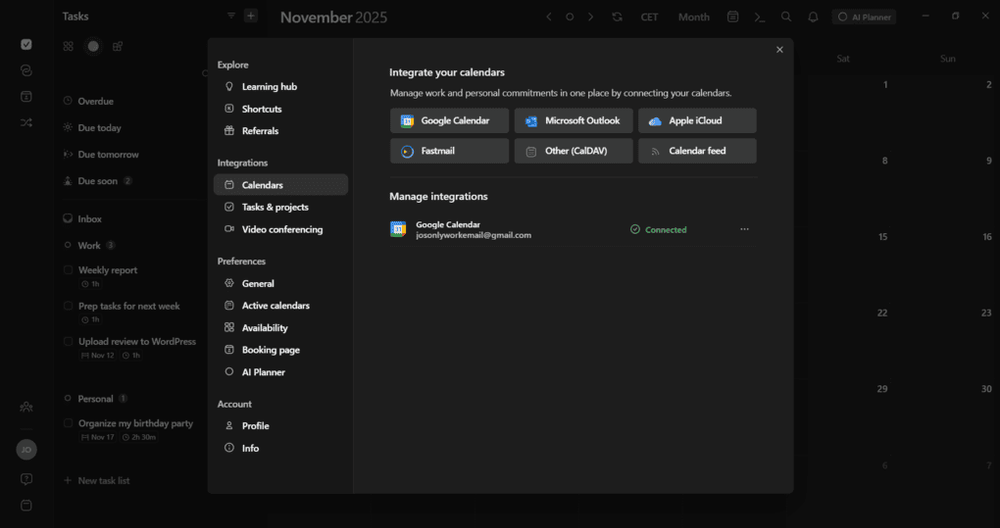
- Task integrations: pulls tasks from Notion, ClickUp, Linear, Todoist, Google Tasks, Microsoft To Do, Outlook email, Apple Reminders, and Obsidian, but doesn't try to replace any of them
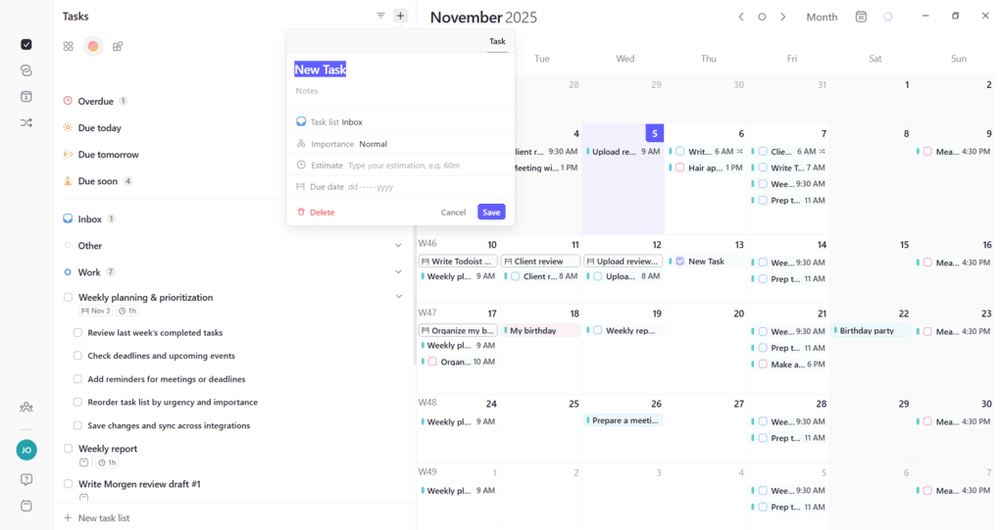
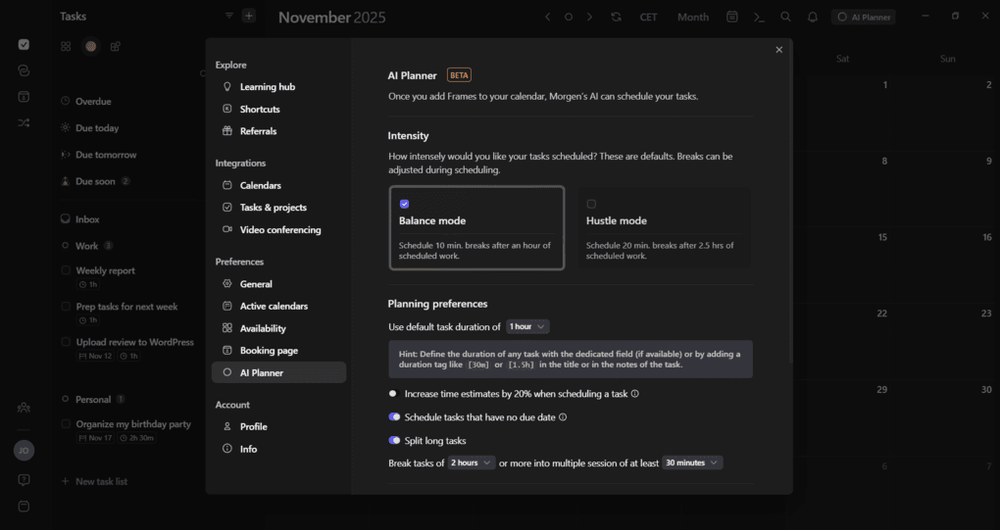
- AI Planner: reads my calendar events and open time slots, then suggests which tasks to schedule based on a "Priority Factor" that weighs due dates, importance, time estimates, and urgency
- Preview-and-approve workflow: see the suggested plan, adjust anything that doesn't fit, and approve it with one click; nothing lands on my calendar without that step
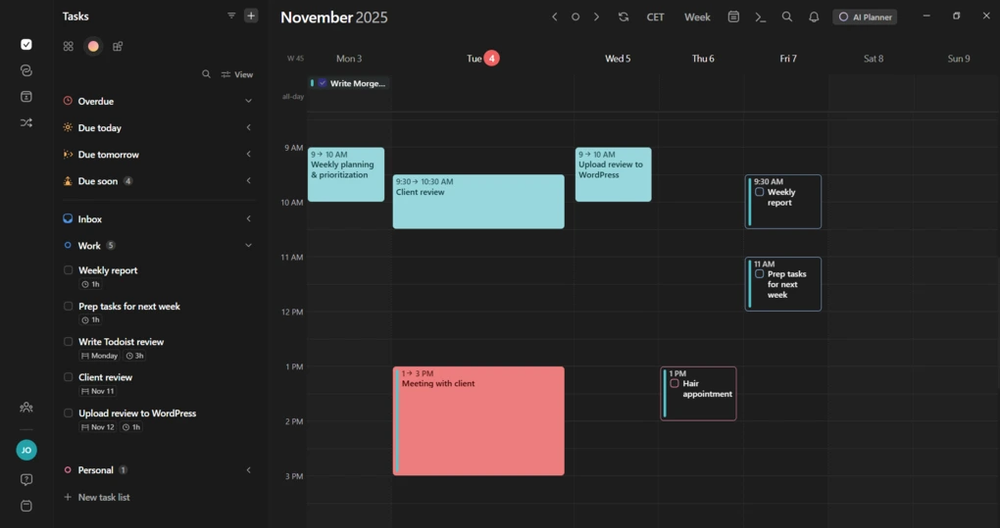
- User Interface: full color-coding along with both light and dark modes. Everything edits in one simple pop-up, so I can tweak times, reminders, and meeting links without jumping between pages.
Does Morgen survive a bad day?
Morgen doesn't really try to. Because the AI Planner only suggests and never auto-executes, a chaotic day with three meetings added at once, a deadline that moved - means I'm the one reviewing and re-approving the plan, not the AI quietly absorbing the chaos. That's a deliberate design choice, not a bug, but it matters for how much relief I should expect on my worst days.

A few things worth knowing before you lean on it:
- The AI Planner's suggestions are hit-or-miss without setup: Reviewers consistently note that Frames need real upfront configuration before the suggestions feel meaningfully smarter than manual time-blocking, skip that setup and you're mostly getting a nicer calendar, not a planning assistant.
- No task dependencies: If you're managing anything sequential - task A has to finish before task B can start then Morgen has no way to model that relationship, so the AI can suggest step two before step one is even eligible.
- Mobile handles viewing and completion only: The full feature set, including Apple Reminders integration and system shortcuts, is desktop-first; if you plan primarily from your phone, you're getting a lighter version of the tool.
The honest reviews of Morgen
Morgen rates unusually well across the board: 4.8 out of 5 on G2 (a smaller review base, in the 20–28 range), 4.3 to 4.5 out of 5 on Trustpilot from around 70 reviewers, and a striking 5 out of 5 average on Capterra.
What's consistent across platforms:
- Praise clusters around design and integrations: "Ease of use," "scheduling," and "calendar integration" are the most-mentioned positive tags on G2, and reviewers on Trustpilot specifically call out the calendar-and-task unification and the responsiveness of the support team.
- Complaints cluster around AI depth, not reliability: The most common critical note, echoed across independent reviews, is that the AI Planner is "still fairly basic" compared to what people now expect - it makes suggestions but doesn't deeply learn your energy patterns or adapt across the week the way some competitors claim to.
- The most useful takeaway from users is simple: if you plan too much work and keep pushing tasks to tomorrow, that is a personal habit issue - no AI planner can fix your time management.
Morgen pricing in 2026
| Plan | Price | What you get |
|---|---|---|
| Pro (individual) | $15/month billed annually, or $30/month billed monthly | Unified calendar, AI Planner, Frames, task integrations, scheduling links |
| Team plans | Priced per seat, contact for current rates | Everything in Pro, plus shared availability and team scheduling features |
There's no permanent free plan as of 2026 - just a 14-day free trial with most Pro features unlocked, backed by a 30-day money-back guarantee if you do commit and change your mind. Verify current pricing directly on Morgen's site before you buy, since this is exactly the kind of pricing that shifts as products mature.
Morgen: pros and cons
What it does well:
- One of the cleanest, fastest calendar interfaces in the category, with reliable two-way sync across every major calendar provider
- The AI never overrides you - every suggestion needs your explicit approval, which is a real, deliberate design choice rather than a limitation
- Native Linux support is rare at this quality level and a real differentiator if that's your platform
- Built-in scheduling links mean one less subscription to manage separately

Where it falls short:
- No free plan, and the $30/month full-price tier is steep for what is, functionally, a calendar with task visibility layered on
- No task dependency support - sequential, multi-step tasks aren't modeled
- The AI Planner needs real upfront Frame configuration before its suggestions feel meaningfully smart, and even then, reviewers consistently describe it as more basic than Motion's or Reclaim's auto-scheduling.
- Full feature set is desktop-first; mobile is for viewing and checking off tasks, not planning
- It doesn't own your tasks - you still need Notion, Todoist, or another tool underneath it for the tasks themselves

Who should buy Morgen?
- You're juggling multiple calendars (work, personal, maybe a shared one) and want them unified in one fast, well-designed view
- You want AI assistance you explicitly approve, not automation that reorganizes your day without asking
- You already use Linux and have struggled to find a polished calendar app that supports it natively
- You want a built-in scheduling-link tool and don't want to pay for Calendly separately
Who shouldn't buy Morgen?
- Your actual bottleneck is manual task organizing itself, not calendar fragmentation - Morgen still asks you to configure Frames and review suggestions daily
- You want full auto-scheduling that replans your day without your involvement - see Motion or Reclaim.ai instead
- You manage projects with sequential, dependent tasks - Morgen has no way to model that
- You plan primarily from your phone, where the feature set is noticeably lighter than desktop
A quick word on Morgen alternatives
If Morgen's price or its approval-based AI isn't quite the fit, I've covered the wider auto-scheduling field in my Motion alternatives roundup and my best AI task managers guide - Reclaim, Akiflow, and Sunsama each solve a different piece of what Morgen leaves on the table.
But there's one alternative worth calling out, because it skips a step Morgen still asks you to do yourself every day: Saner.ai.
Morgen needs you to have tasks already defined in a connected tool before its AI Planner can suggest anything, and it needs you to review and approve that suggestion each morning. Saner.ai is built around removing both of those steps. It's centered on an AI voice-to-calendar workflow - you talk to it, forward it a messy email, or dump a thought, and its AI reads the intent, breaks anything vague or oversized into concrete steps on its own, and schedules the result directly. There's no separate "define this as a task first" phase, and no daily approval click required to get moving.
The proactive part matters most here. Morgen waits for you to open the app and review a suggestion. Saner.ai's builds a draft plan overnight from your notes, inbox, and unfinished items, so you're editing something already built rather than approving something freshly suggested - a different relationship to the daily planning ritual, not just a faster version of the same one.
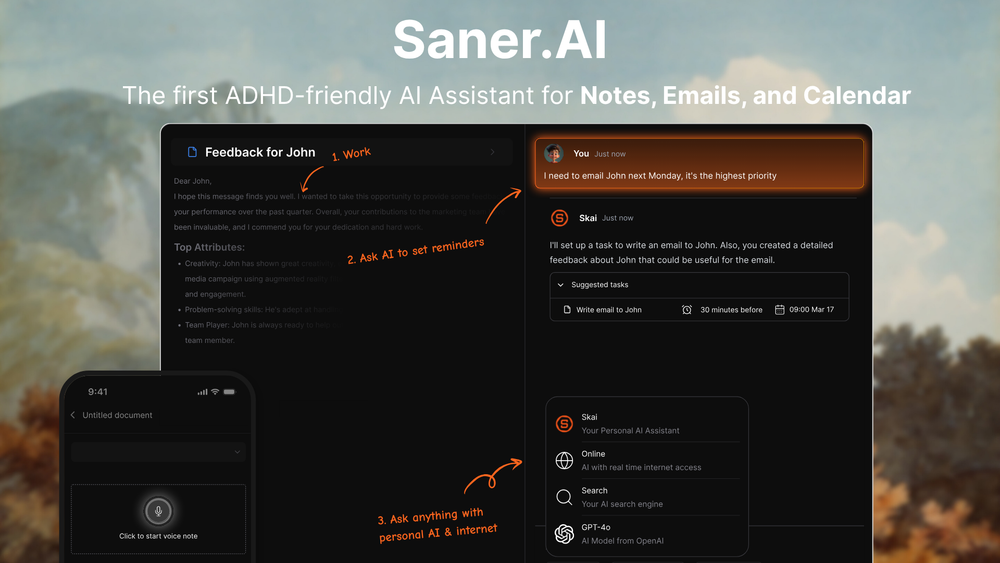
- Price: Free plan available; paid tiers from $8/month (Starter) to $16/month (Standard) - meaningfully cheaper than Morgen's $15–30/month
- Best for: People whose actual bottleneck is capture or daily decision fatigue, not calendar fragmentation - tasks that never make it onto any list, easily overwhelmed brain with ADHD-related time blindness, or a week where notes, tasks, and calendar have become three unrelated messes
If your honest reaction to Morgen's daily "review and approve" step is relief that you're still in control, Morgen is the better fit. If it's quiet dread that there's one more decision to make before your day can start, that's the gap Saner.ai closes.
The verdict
Morgen is one of the best-designed calendar apps I've tested, full stop - the unified view alone solves a real, research-backed cost of switching between fragmented calendars, and the AI Planner is a useful nudge for people who want suggestions, not decisions, made on their behalf. I'd put it at 7.5/10: high marks for craft, sync reliability, and Linux support, with real deductions for the lost free plan, the shallow AI compared to category leaders, and the lack of task dependency support that keeps it from being a complete project-planning tool.
Buy it if a clean, unified calendar with light AI assistance is what you're missing. Don't expect it to replace your task manager, and don't expect the approval step to disappear - that's the whole design, not a rough edge.
FAQ
Is Morgen worth $15–30 a month? If calendar fragmentation across work, personal, and shared calendars is your actual daily friction, yes - the unified view and reliable sync are worth the price on their own. If you're hoping the AI will meaningfully reduce daily decision-making, know going in that every suggestion still needs your approval.
Does Morgen have a free plan? No, not as of 2026, just a 14-day free trial with most Pro features, backed by a 30-day money-back guarantee. Reclaim.ai is the closest comparable tool that still offers a free tier.
Does Morgen auto-schedule like Motion? No, this is the core design difference. Morgen's AI Planner suggests a plan and waits for your explicit approval before anything lands on your calendar. Motion and Reclaim both auto-schedule without that step. See my Motion alternatives roundup for how the auto-scheduling tools compare.
Is Morgen good for ADHD? Morgen's own materials pitch its color-coded calendar and Frame templates as reducing decision fatigue by externalizing your plan visually, which lines up with real research on ADHD and time-perception difficulty. Others find the daily approval step adds friction on exactly the days they have the least bandwidth for it. See my AI assistants for ADHD roundup for tool-specific picks, and talk to a professional if this feels like more than everyday disorganization.
What's the real difference between Morgen and Saner.ai? Morgen unifies your existing calendars and suggests a plan for tasks you've already defined elsewhere, which you then approve. Saner.ai turns unstructured input - voice notes, emails, scattered thoughts into scheduled tasks itself, then proactively drafts your day around them without a daily approval step.



