Reclaim vs Saner.AI: Calendar Bodyguard or Personal Assistant?

The post
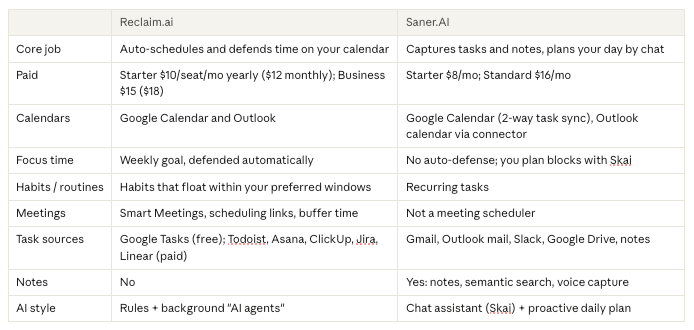
Quick answer: Reclaim is a calendar bodyguard. It sits in the background and defends focus time, habits and task blocks from meetings. Saner.AI is an inbox brain. It catches tasks from email, notes and Slack, and an AI assistant plans your day with you. If your problem is "people keep booking over my deep work," get Reclaim. If it's "I don't even know what my tasks are because they're in 9 places," get Saner. And since both have free plans, plenty of people can run both.
Disclosure up front: Saner.AI is built by the team behind this site. Our own Reclaim alternatives roundup already says that if Reclaim does what you need, switching to Saner for calendar optimization would be a downgrade. We still think so. This post is about when each one fits.
Reclaim vs Saner.AI at a glance
The real difference: where your day breaks
Most "which app" debates skip this. Pick by the spot where things actually go wrong.
Your day breaks at the calendar if:
- Your focus blocks get booked over by 10am
- You live in recurring meetings and back-to-backs
- You say "I'll do the deep work after lunch" and then lunch is a call
Microsoft's 2025 Work Trend Index found employees get interrupted every two minutes during core hours, about 275 times a day, by meetings, email or chat. If that sounds like your Tuesday, the calendar is your weak spot. Reclaim was built for exactly this.
Your day breaks before the calendar if:
- Requests arrive in email, Slack DMs and meeting notes, and half never become tasks
- You keep a to-do list but it's always out of date
- You open your planner, see 40 items, and close it again
That's a capture problem. A smarter calendar won't fix it, because the tasks never reach the calendar in the first place. That's Saner's lane.
What Reclaim does well
Reclaim works best once you stop touching it.
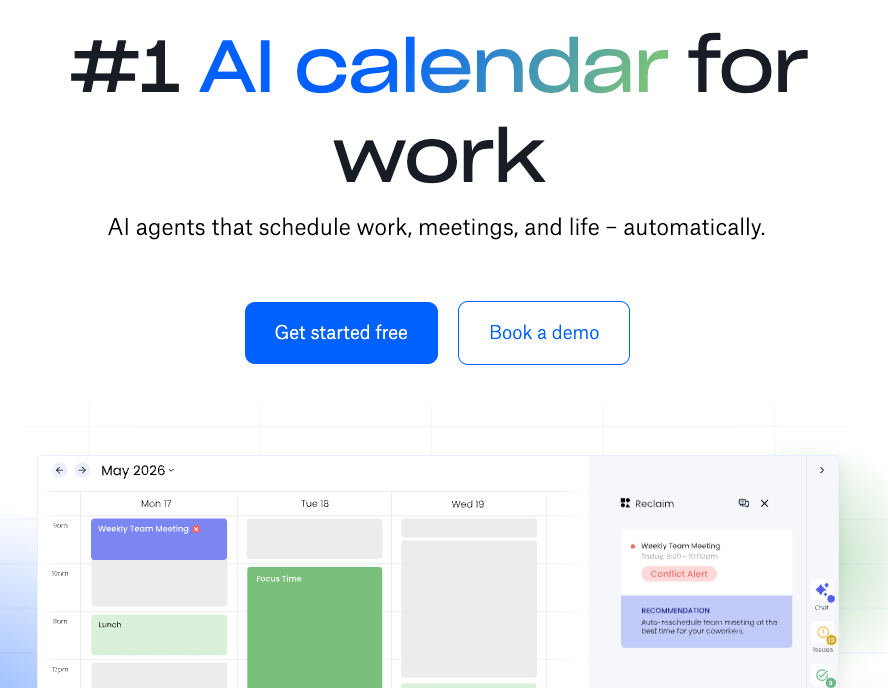
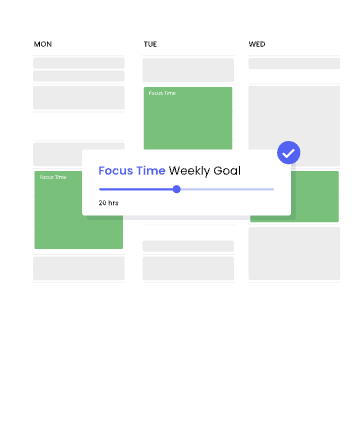
Focus Time. You set a weekly target with a slider. Reclaim blocks that time around your meetings, and when someone books over a block, it moves the lost time elsewhere in your week. You don't drag anything.
Habits. Lunch, gym, inbox triage, a weekly review. You give each one a preferred window, days and frequency, and Reclaim finds a slot around your existing events.
Tasks. Give a task a duration and a due date. Reclaim blocks flexible time before the deadline, and higher priorities get scheduled sooner. On paid plans tasks can sync in from Todoist, Asana, ClickUp, Jira and Linear.
Meetings. Smart Meetings handle recurring meetings and conflicts. Scheduling links and buffer time are built in. There's also a Slack status sync, so your team sees "in focus time" without you saying it.

Outlook support. Reclaim says Outlook support is fully available, with some gaps: no delegated or shared Outlook calendars, no on-prem Exchange, no Outlook Tasks integration.
The Drawbacks:
- It's a calendar tool, so it can't find tasks hiding in your inbox. If a task never gets typed in, Reclaim can't schedule it.
- No notes. Meeting notes and ideas live somewhere else.
- The free plan only schedules one week ahead.
- It takes a bit of tuning. Hours, priorities, habit windows. Expect a fiddly first afternoon.
I go deeper in our full Reclaim review.
What Saner.AI does well
Saner starts upstream. It's an AI assistant (called Skai) sitting on top of your notes, email, calendar and tasks.
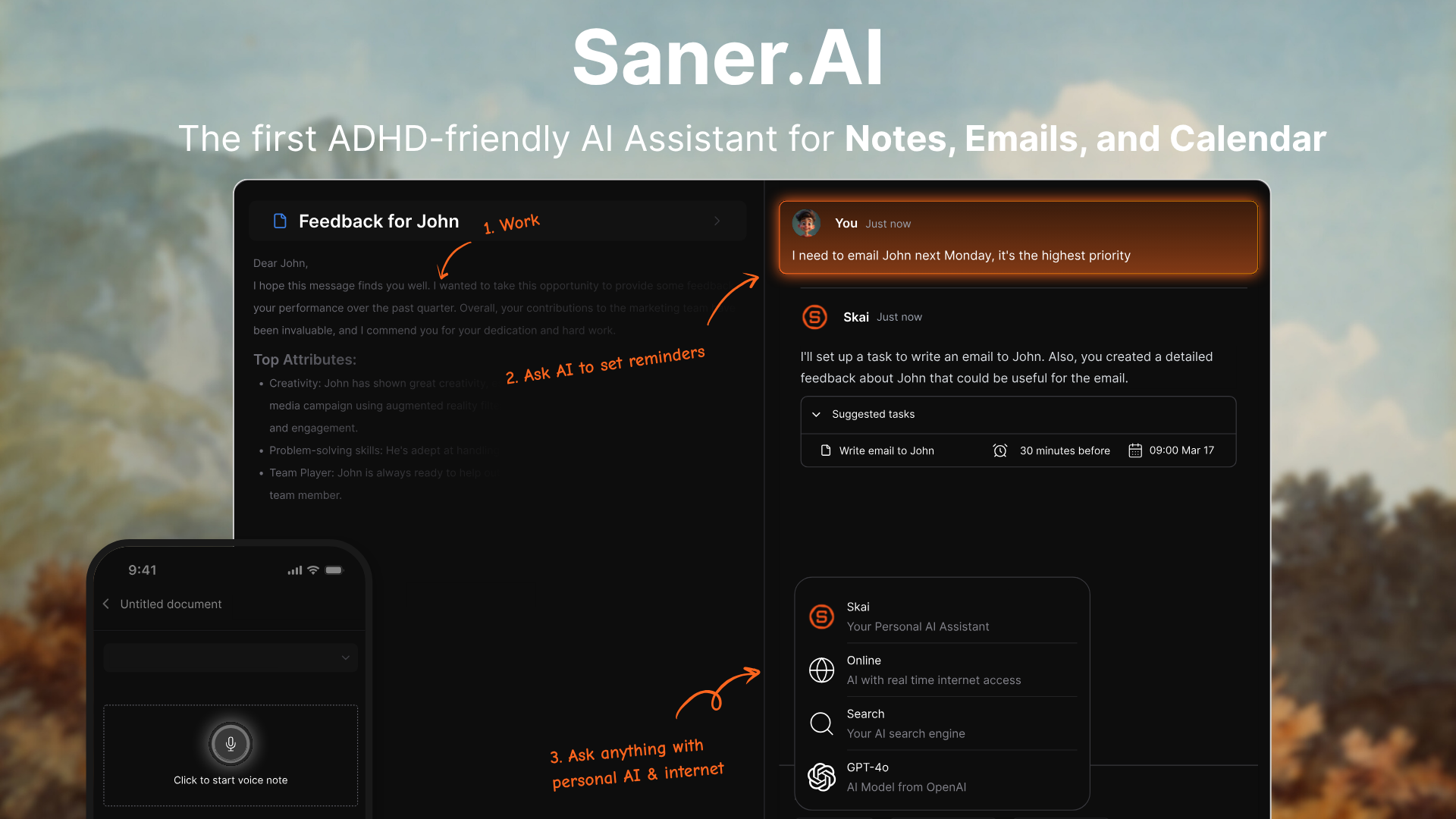
Catching tasks. The Smart Inbox turns emails into tasks with reminders. Gmail, Outlook mail and Slack connect on every plan, including Free
Planning by chat. Skai builds a daily plan from your tasks, notes, calendar events and emails. You can talk back to it: "move the report to Thursday, today's full." It also sends a daily summary at a time you choose, based on your calendar, overdue tasks and recent notes.
Calendar blocks. Tasks can have durations (30m, 2h) and show up as blocks in the calendar view. Tasks sync both ways with Google Calendar.
Notes that do something. Voice capture, Smart Add (type a messy thought, get a note or a task), and semantic search that finds notes by meaning. Ask Skai to break a big task into subtasks and it will.
Focus Box. Pin up to three tasks so they stay visible while you work. On iPhone they can sit on the lock screen through Live Activities.
Where it pinches
- It won't defend your calendar. No auto-protected focus time, no habit juggling, no meeting scheduling links. If coworkers book over your block, Saner won't fight back.
- Fewer project-tool integrations. No Jira, Asana, Linear or Todoist sync.
- It's younger than Reclaim
Pricing, side by side
Checked October 27, 2026.
Reclaim (pricing)
- Lite: free forever. 1 user, 1-week scheduling range, 1 calendar sync, 1 scheduling link, limited integrations (Google Tasks, Slack, Zoom, Google Meet)
- Starter: $10/seat/month yearly, $12 monthly. 8-week range, 3 calendar syncs, task integrations
- Business: $15/seat/month yearly, $18 monthly. 12-week range, unlimited syncs and links
- Enterprise: $22/seat/month, yearly only
Saner.AI (pricing)
- Free:
- Starter: $8/month.
- Standard: $16/month.
- Yearly billing shows a ~20% discount toggle
A solo person can run Reclaim Lite plus Saner Free for $0. That's a nice way to test the setup further down.
How to decide between Reclaim.AI and Saner.AI?

"I'm an engineer. My calendar gets eaten by standups and syncs, and my tickets live in Jira." → Reclaim. Focus Time plus the Jira integration (paid) is your whole problem solved.
"I'm a founder. My tasks come from 80 emails and a dozen Slack threads a day." → Saner. Reclaim can't schedule a task it never heard about.
"I'm a manager. Recurring 1:1s keep colliding." → Reclaim. Smart Meetings exist for this.
"I take lots of notes and lose half the action items." → Saner. Notes and tasks live in the same place, and if it's in your notes, you can ask Skai what you promised in last Tuesday's call. (Also see my guide to turning meeting notes into tasks with AI.)
Switching from Reclaim to Saner (or back)
Reclaim → Saner
- Copy your open tasks into one Saner note and ask Skai to turn them into tasks with dates.
- Recreate key routines as recurring tasks.
- Accept that nobody will defend your focus blocks now. Use Google Calendar's own focus time if your Workspace plan includes it.
Saner → Reclaim
- Export your notes from Saner first so your knowledge doesn't get stranded.
- Move active tasks into Reclaim (or into Todoist/Asana and connect them on a paid plan).
- Set up Focus Time and Habits before you delete anything.
Other comparisons
- Want full auto-planning? Read Motion vs Reclaim and Motion vs Saner AI.
- Keyboard-first task inbox? Akiflow vs Saner AI.
- Notes-first? Mem AI vs Saner AI.
- Shopping more widely? Our best AI scheduling assistants list.
The verdict

Reclaim is the better calendar. It defends time you'd otherwise lose, and the free plan is generous for one person.
Saner is the better catch-all. It finds the work, remembers the context, and talks you through the day. It won't stop a coworker from booking your 10am.
So ask one question: does your work get lost before it hits the calendar, or on the calendar?
Before → Saner. On → Reclaim. Both → start with the two free plans and run the stack for a week. 🛡️
FAQ
Is Reclaim better than Saner.AI? For protecting focus time, yes. Reclaim defends your calendar automatically. For catching tasks from email, Slack and notes and planning your day by chat, Saner.AI fits better.
Can Saner.AI replace Reclaim? Only if you don't need automatic calendar defense. Saner shows timed tasks as calendar blocks and syncs with Google Calendar, but it doesn't auto-protect focus time or run meeting scheduling links.
Can I use Reclaim and Saner.AI together? Yes. Both connect to Google Calendar, and both have free plans. Let Saner handle capture and the daily plan, and let Reclaim handle focus time, habits and meetings. Check in week one how Reclaim treats Saner's synced task events.
How much does Reclaim cost? The Lite plan is free. Starter is $10/seat/month billed yearly or $12 monthly, and Business is $15 yearly or $18 monthly (checked Oct 27, 2026).
Does Reclaim work with Outlook? Yes. Reclaim says Outlook support is fully available, though delegated or shared calendars, on-prem Exchange and Outlook Tasks aren't supported.
Does Saner.AI have a free plan? Yes. Paid plans are $8/month (Starter) and $16/month (Standard).