Motion vs Saner.ai (2026): Which AI Calendar is better?

I've used both of these tools on my actual calendar, not a demo account, for weeks at a time. Motion and I have a complicated one-year history that I've written about before. Saner.ai is newer to my rotation, but it's the tool I keep coming back to when my brain feels like 40 browser tabs. These two tools aren't really solving the same problem. Let's me show you how

What Motion is
Motion started life as a pure AI auto-scheduler and has since ballooned into what it now calls an "AI Employee SuperApp." Underneath the marketing, the core trick hasn't changed: you give it tasks with deadlines and priorities, and it decides when you'll do them.
- The core mechanic: you add a task, set a deadline and a priority (High/Medium/Low), and Motion's algorithm finds a slot for it on your calendar - then reshuffles everything downstream the moment a meeting lands on top of it.
- Calendar sync: works with Google Calendar, Outlook, and Apple Calendar.
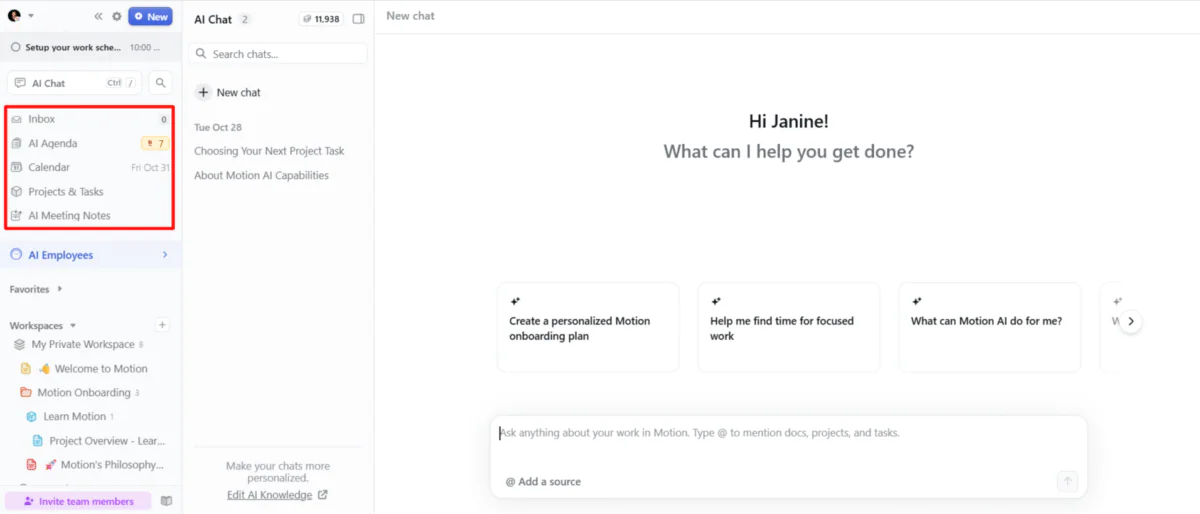
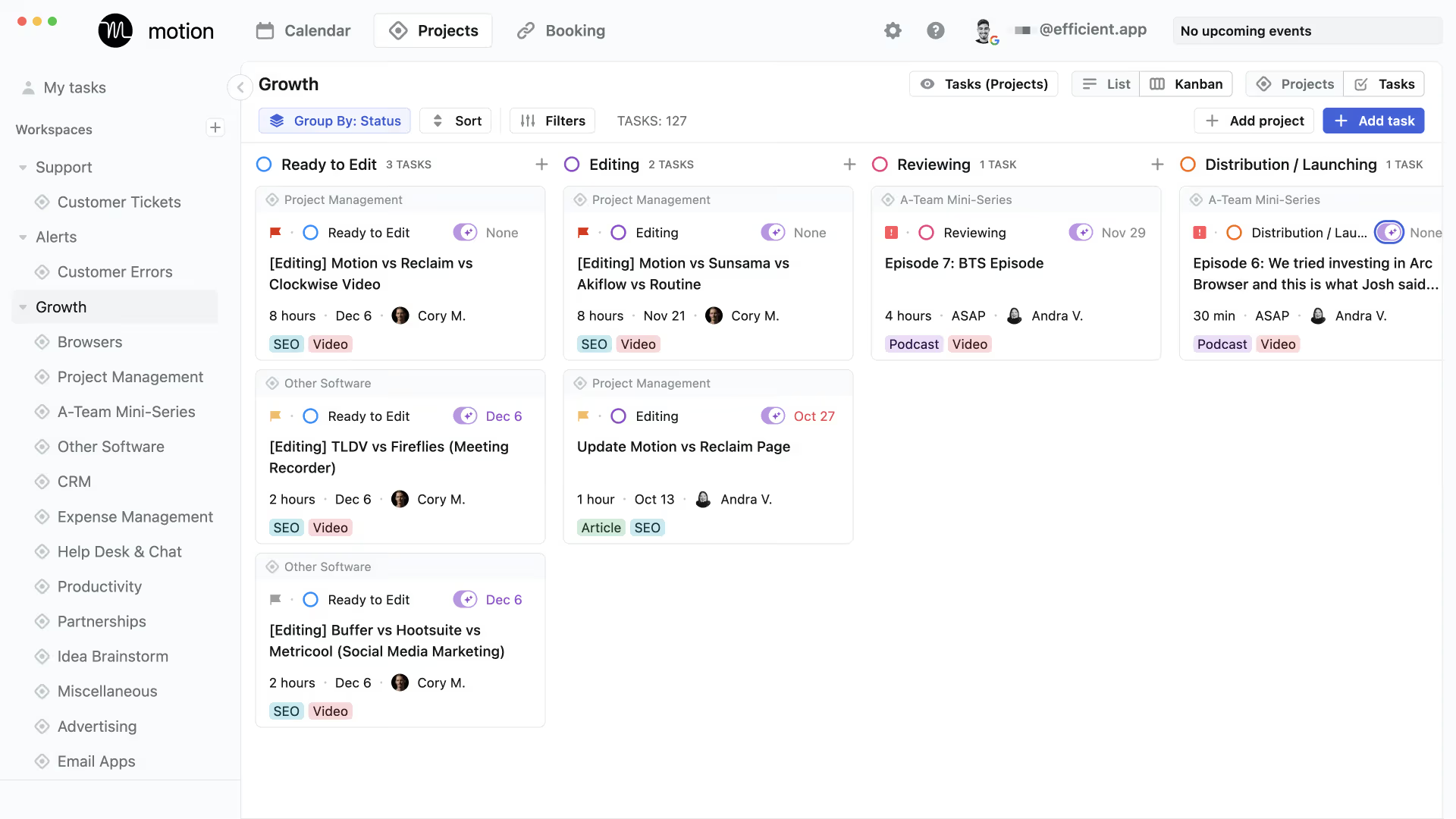
- Beyond scheduling: Kanban-style project boards, task dependencies, meeting booking pages, Focus Time and No-Meeting Time protection, and a Docs feature for notes and meeting agendas.
- Pricing: $49/month "AI Employees" for people who want pre-built AI agents doing sales, support, or research work, not just scheduling. There's no permanent free plan, just a 7-day trial that wants a card up front.
- AI credits are metered on top of the subscription, so your real monthly cost can run higher than the sticker price if you lean on the AI features hard.
The thing Motion is excellent at is what it was originally built for: taking a task list I already trust and finding realistic time for it, then defending that time when my day gets messy. If you've done the work of figuring out what needs doing, Motion is very good at figuring out when.
Where it falls flat: Motion has no idea what's in your inbox, your Slack, or that voice memo I left in the Uber. It's an output scheduler, not an input processor - I still have to do the work of turning "stuff in my head" into a clean task before Motion can touch it.
What Saner.ai is
Saner.ai takes the opposite entry point. Instead of assuming I already have an organized task list, it assumes I don't - and it's built to get me from "unstructured mess" to "scheduled day" without a middle step where I have to organize things by hand first.
The engine behind it is an AI assistant called Skai, and this is where Saner.ai earns its "proactive" label rather than just claiming it in a tagline:
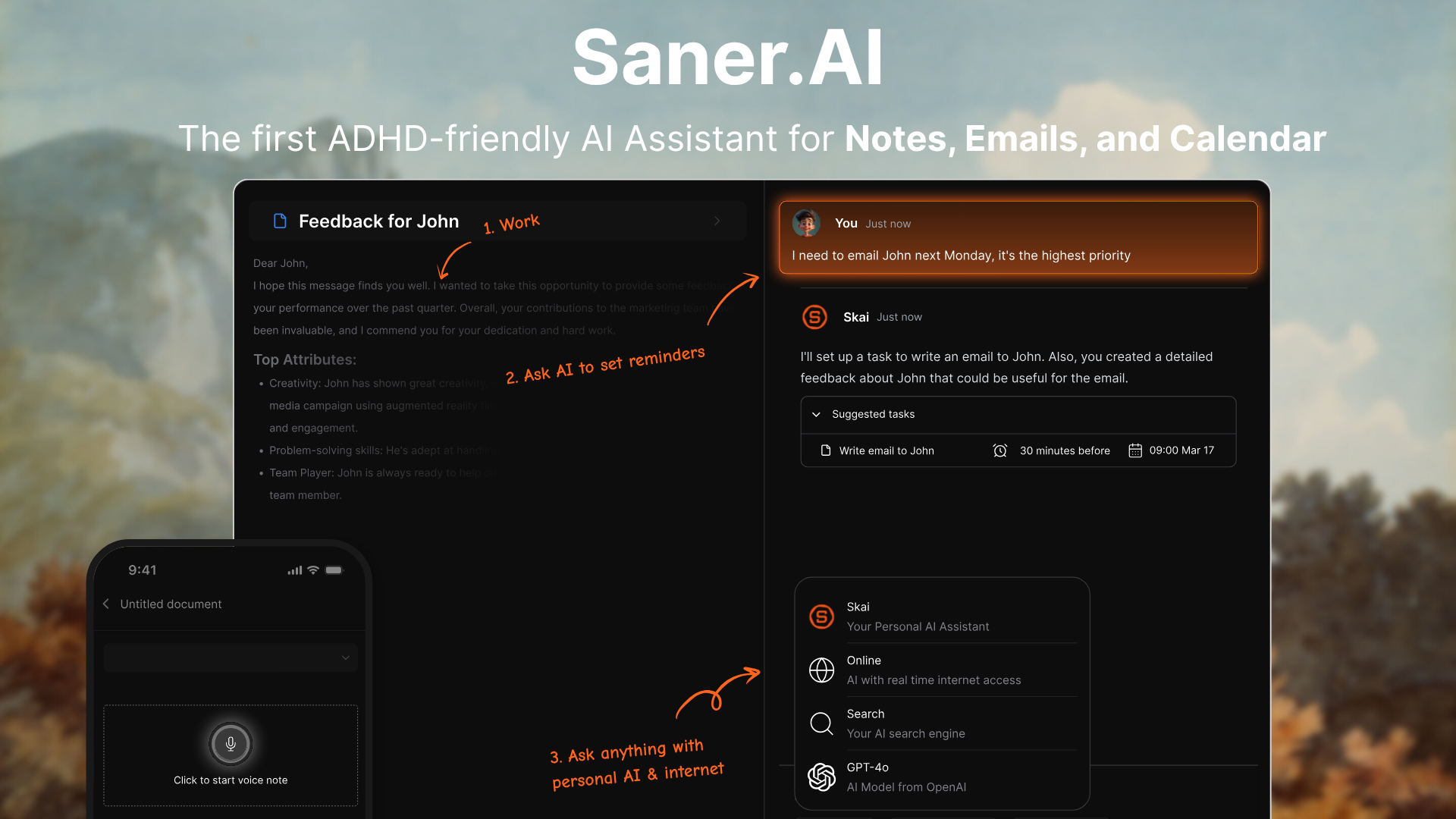
- Talk to your calendar, don't just click on it. Say "plan my day" or dump a voice note about everything on my mind, and Skai turns that into scheduled, time-blocked tasks.
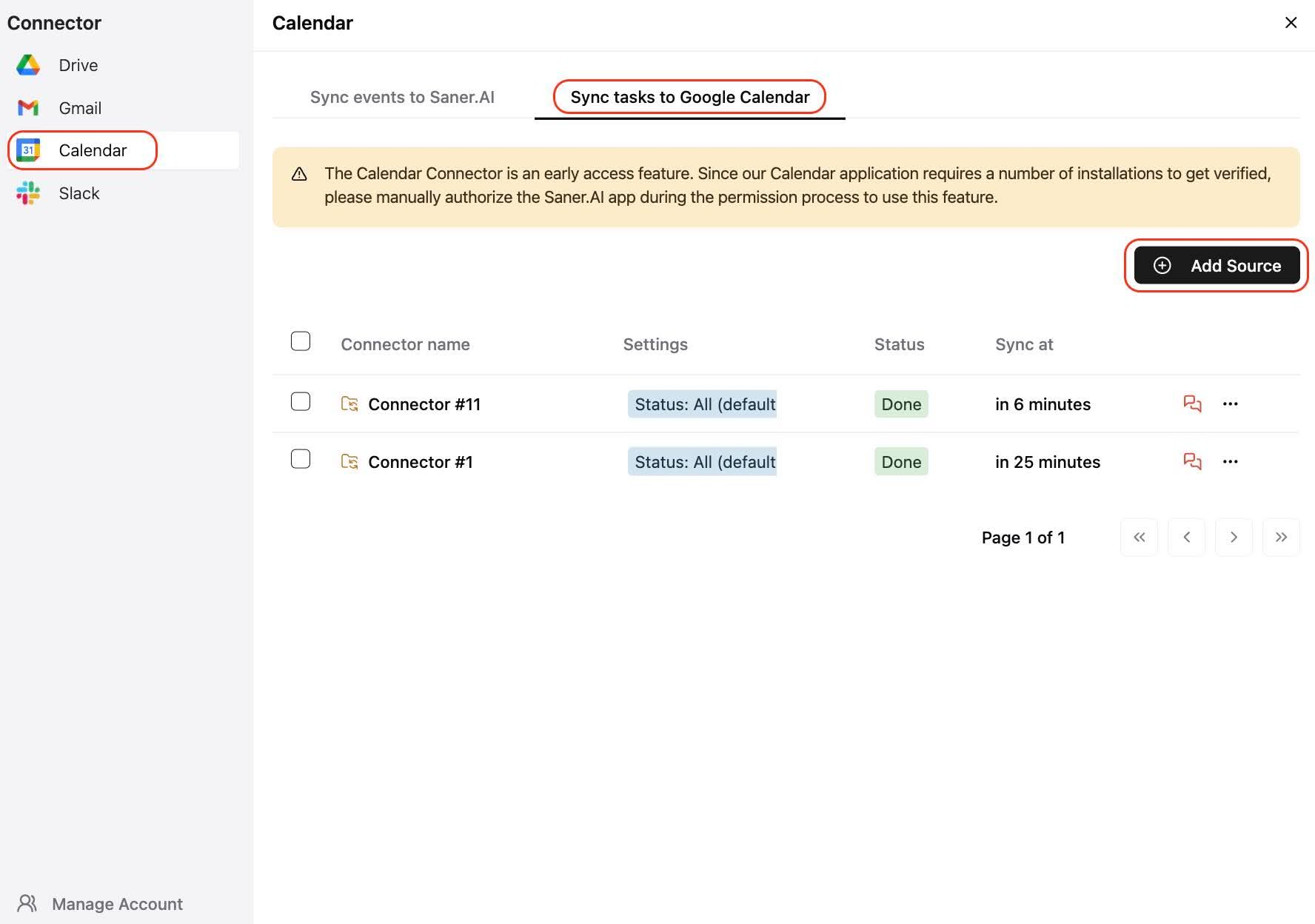
- It pulls from where your life actually happens. Saner.ai connects to Gmail, Google Calendar, Slack, and Drive, and Skai reads across all of it - email, notes, unfinished threads from yesterday to build a single, unified picture instead of making I manually feed it a clean list.
- It's proactive, not reactive. Instead of opening to a blank page every morning, Skai builds a plan overnight from your notes, inbox, and whatever didn't get finished the day before closer to a human assistant reading the situation than a calendar waiting for input. This is consistently the single most-mentioned feature in user reviews
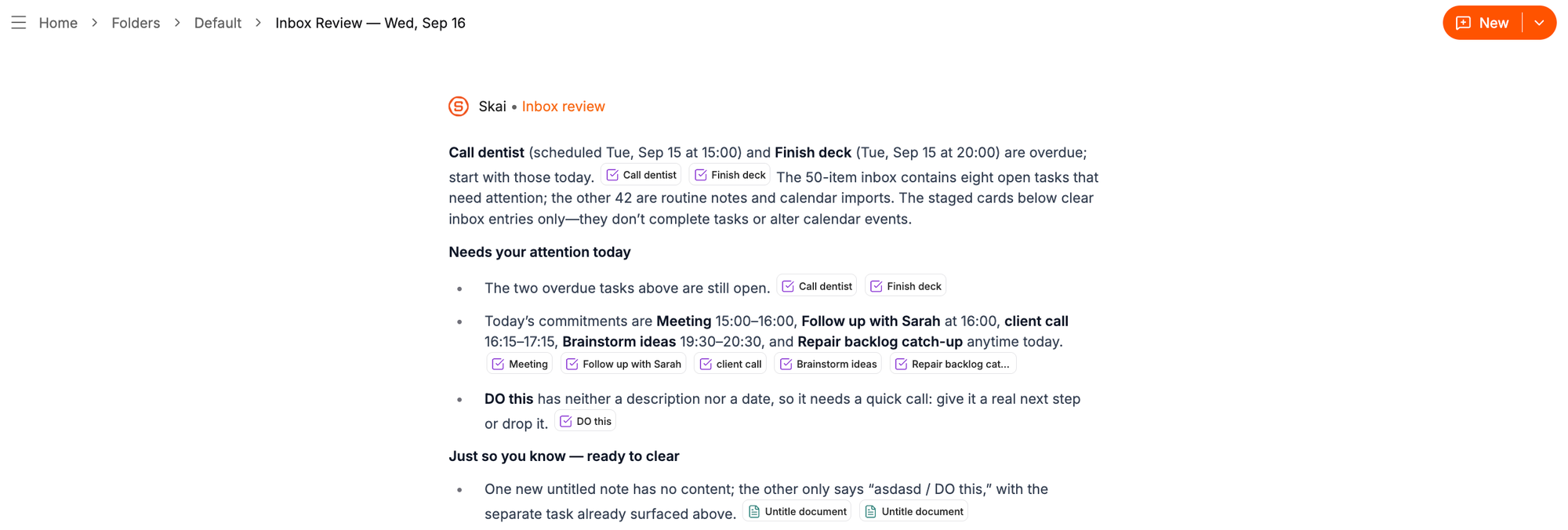
- It's also a task manager and a notebook, not just a calendar layer - notes, tasks, and email live in the same workspace, with AI-suggested folders and tags so nothing gets lost.
- Pricing: a free tier (30 AI messages/month, 100 notes, 100MB storage), then Starter around $8/month and Standard around $16/month on annual billing.
Motion vs Saner.ai: the actual comparison table
| Motion | Saner.ai | |
|---|---|---|
| Core mechanic | Auto-schedules a task list you already have | Builds your task list and schedule from raw input (voice, email, notes) |
| Best for | Clean backlog, packed week, wants zero input step | Scattered inputs, ADHD-friendly, wants a proactive daily plan |
| Free plan | No — 7-day trial only | Yes — 30 AI messages/month |
| Starting price | $19/seat/month (annual) | Free, or $8/month (Starter) |
| Reads your inbox/notes | No | Yes — Gmail, Drive, Slack, notes |
| Voice/braindump capture | Not a core feature | Core feature (Skai parses messy voice/text input) |
| Proactive morning plan | No, you build the plan | Yes, built overnight from your data |
| Project management depth | Strong — Kanban, dependencies, docs | Light — no Gantt charts or complex dependencies |
| Team scheduling | Yes, built for teams | No, single-player for now |
| Mobile experience | Weaker than desktop (2.7/5 on Google Play, per user reports) | Newer app, less field-tested at scale |
The difference isn't features. It's where your bottleneck is.
Here's the thing that took me kinda long to figure out, and it's the whole reason "Motion vs Saner.ai" is a slightly misleading question: these tools solve for two different failure points in the same pipeline.

Getting something done requires roughly three steps: capture it, structure it into an actual task, then schedule it. Motion is a phenomenal scheduler that assumes steps one and two already happened. Saner.ai tries to own all three steps, with an emphasis on the first two, because for a lot of people - myself very much included on bad weeks, capture is where things actually die. The task never gets written down. It stays a vague dread sitting behind your eyes until the deadline is suddenly today.
If your answer is "I know exactly what I need to do, I just never get around to when," you have a scheduling problem. Get Motion.
If your honest answer is closer to "half the stuff I need to do is still rattling around in my head, an email thread, or a note I'll forget," you have a capture problem, and no amount of scheduling brilliance fixes that. That's Saner.ai lane, and it's the reason I've written about it as my top ADHD-friendly pick more than once, see my best AI assistants for ADHD roundup for the longer version of that argument.
When to pick Motion or Saner.AI?
- You have a clean task list and a calendar full of meetings that keep eating your work time: Motion. It's the strongest tool for defending scheduled time once tasks already exist.
- Your tasks come from a dozen sources: Slack, email, your own head at 11pm and half of them never make it onto a list at all: Saner.ai. This is the exact gap it's built to close.
- You have ADHD, or your brain just doesn't do "plan the day from a blank page" well: Saner.ai's proactive overnight plan removes the blank-page problem entirely, which matters more than any feature comparison.
- You manage a team and need shared calendars, dependencies, and Kanban boards: Motion, no contest. Saner.ai isn't built for team project management yet.
- You want to test-drive without a credit card: Saner.ai has a free tier. Motion's trial requires payment info upfront.

How to Set Up Saner.AI and Motion?
Whichever one you pick, don't skip this part - most people abandon AI schedulers in under two weeks because they never actually configured them, per the pattern I keep seeing across every AI task manager I've tested.
- Connect your real calendar, not a test one: Both tools need to see your actual commitments: client calls, the dentist, the recurring meeting you haven't figured out how to decline to schedule around reality instead of a clean slate.
- Set your working hours: If you're useless after 4pm, tell it 4pm. Both tools respect this setting, and almost nobody sets it truthfully the first time.
- Start with one input source, not five: For Saner.ai, that means connecting Gmail first and leaving Slack for week two. For Motion, that means adding this week's actual tasks, not your entire backlog from the last six months.
- Do one deliberate brain dump (Saner.ai) or one honest priority pass (Motion) in the first session: For Saner.ai: type or speak everything on your mind into one box with zero structure, and watch what it turns into. For Motion: assign real priority levels to fifteen actual tasks and watch what it builds - if your gut reaction to the result is "no, not then," that's useful data.
- Leave 20% of your day unscheduled: Both tools will happily fill 100% of your calendar if you let them, and a fully booked day has zero room to absorb the one thing that always goes wrong.
- Review at day 14, not day 2: If it's fighting you more than helping by then, that's real information about fit - not a personal failure. This is the same rule I use for planning a day with AI generally, and it holds here too.
FAQ
Is Motion or Saner.ai better for ADHD? Saner.ai is the one built specifically around ADHD workflows - its proactive morning plan and brain dump directly target the time-perception and task-initiation friction described in the research above.
Does Saner.ai actually read my email and turn it into tasks automatically? Yes - that's its core differentiator. Skai connects to Gmail (and Drive, Slack, and Calendar) and pulls structure out of messy inputs directly into scheduled tasks, including breaking oversized or vague tasks into smaller steps.
Can Motion do what Saner.ai does? Not really, at least not today. Motion has no email or note-reading layer - you have to hand it a formatted task. It's an excellent scheduler and a weak capture tool.
Is there a free version of either? Saner.ai has a free tier. Motion does not, it's a 7-day trial that requires a credit card.
Which one is cheaper? Saner.ai, by a wide margin at entry level - free or $8/month versus Motion's $49/month minimum, though Motion's project management depth is meaningfully greater if you actually need it.
Can I use both? Some people do - Saner.ai for capture and daily planning, Motion (or a lighter tool like Reclaim) for defending focus blocks on a team calendar. It's redundant for most solo users, but it's not crazy for someone running both a scattered personal workload and a structured team project simultaneously.