How I Use AI to Stop Procrastinating

I once rescheduled "renew passport" eleven times. Eleven.

That's the problem with most to-do tools. They store what you're avoiding. They don't help you start it.
AI can. There's no magic willpower dust involved. The things that make people put off tasks (a vague first step, a task that feels gross, no clear "when," a bad mood you're trying to escape) are the things a good AI assistant is decent at chipping away.
This guide shows you how to set that up, with prompts you can copy tonight.
The quick answer
To use AI to stop procrastinating, do four things:
- Name the feeling. Ask the AI to help you figure out why this task feels bad (boring, scary, unclear, too big).
- Shrink the first step until it takes under 10 minutes and starts with a verb like "open," "write," or "send."
- Turn it into an if-then plan tied to a specific time and place, then put it on your calendar.
- Let the AI follow up. Use a tool that resurfaces the task at the right moment, and reviews what slipped each week without shaming you.
Why you procrastinate
Here's the part most productivity advice skips. Procrastination is usually a mood problem, not a time problem.
Psychologists Fuschia Sirois and Timothy Pychyl describe procrastination as "the priority of short-term mood repair": you delay the task because avoiding it makes you feel better right now, and your future self pays the bill. (Future Theo has sent past Theo several angry invoices.)
The biggest meta-analysis on the topic, by Piers Steel in Psychological Bulletin, found that the strongest and most consistent predictors of procrastination were:
- task aversiveness (the task feels unpleasant)
- task delay (the payoff is far away)
- low self-efficacy (you doubt you can do it well)
- impulsiveness and distractibility
- lower conscientiousness, including organization and self-control
Look at that list for a second. Only one item is about "being lazy," and even that one is mostly about impulse control and organization. Several of them are fixable with better setup. That's where AI earns its keep.
What AI is good at (and what it isn't)
Where AI helps a lot
- Making vague tasks concrete. "Deal with taxes" becomes "open last year's return and find the total on line 24."
- Lowering the start cost. It drafts the ugly first version of the email so you're editing instead of staring.
- Remembering for you. A connected assistant can bring the task back at 10am on tmr instead of letting it rot in a list.
- Being a nonjudgmental rubber duck. You can type "I don't want to do this and I don't know why" and get a useful answer

- Spotting patterns. Ask it which tasks you've deferred three times and it'll show you your avoidance hotspots.
Where AI won't save you
- It can't make the task pleasant. A tax return is still a tax return.
- It can't choose your priorities. If you don't care about the task, a better prompt won't create caring. (Sometimes the right move is deleting the task. More on that later.)
- It becomes a new procrastination tool. Tweaking prompts for 45 minutes is still not writing the report. I say this with love and experience. 🙃
- It doesn't replace real help. If avoidance is tied to anxiety, depression, or ADHD, AI is a support tool, not treatment. Talk to a professional.
The 5-step AI system to stop procrastinating
Step 1: Capture the avoided task somewhere the AI can see it
You can't fix what's floating around in your head at 2am.
Pick one place where tasks live, and make sure your AI can read it. That can be:
- a connected AI assistant that reads your tasks, notes, and calendar together
- a task manager with built-in AI
- at minimum, a single note you paste into ChatGPT or Claude
If your tasks are split across sticky notes, three apps, and your email drafts folder, start there. Our guide to AI for task management walks through a full capture setup, and if you haven't picked a tool yet, the best AI task manager roundup compares the main options.
Quick win: Tonight, dump every task you've been avoiding into one list. Don't organize it. Just get it out.
Step 2: Ask the AI why each task feels bad

This is the step almost nobody does, and it's the one that works best for me.
Different flavors of avoidance need different fixes. Paste your avoided list into the AI with this prompt:
Here are tasks I keep putting off: [list]. For each one, ask me one short question to figure out why I'm avoiding it. Then sort them into: unclear, too big, boring, anxiety-inducing, or not actually important. Don't give me advice yet.
Then answer. You'll get something like:
- Unclear: "update website" (update what?)
- Too big: "write the Q4 report"
- Boring: "file expense receipts"
- Anxiety-inducing: "reply to the client who's annoyed"
- Not actually important: "learn Spanish by December"
Each bucket gets its own treatment in Step 3.
Step 3: Use the matching AI fix for each type
If it's unclear: ask the AI to interview you
Vague tasks are procrastination magnets
I need to [task]. Before suggesting steps, ask me up to 5 questions about the deliverable, deadline, and what "done" looks like.
After it asks, tell it to write a one-sentence definition of done. Paste that sentence into the task itself.
If it's too big: shrink the first step to under 10 minutes
Break [task] into steps. The first step must take under 10 minutes, start with a concrete verb (open, write, send, call, find), and require no decisions.
The magic is in "require no decisions." Decisions are where people stall.
For more on this, see our full walkthrough on how to break down a task with AI.
If it's boring: bundle it and time-box it
Boring tasks don't need more thinking. They need a container.
Group these boring tasks into one 25-minute batch, ordered from fastest to slowest: [list]. Give me a checklist I can tick off.
Put on a playlist. Tick things. Done. Boredom hates a timer.
If it's anxiety-inducing: let the AI write the scary first draft
For me, this is the biggest one. The dreaded email, the awkward follow-up, the "I missed the deadline" message.
Draft a short, calm reply to this message: [paste]. Keep it under 100 words. Acknowledge the issue, give one next step, no groveling.
You'll still edit it. But editing a draft feels about ten times easier than writing from a blank box. And please read it before sending. AI occasionally apologizes for things you didn't do. 😅
If it's not important: delete it or schedule a "decide" date
Here's a task I've deferred for weeks: [task]. Give me the strongest case for deleting it, and the strongest case for doing it this week.
Some tasks deserve to die. Let them go. If you're unsure, ask the AI to set a "decide by" date instead of a "do by" date.
My post on how to prioritize tasks with AI has a longer process for this.
Step 4: Turn the first step into an if-then plan

An "implementation intention" is a plan in the form "If situation X happens, then I will do Y." A meta-analysis by Peter Gollwitzer and Paschal Sheeran covering 94 independent tests and more than 8,000 participants found that forming these if-then plans had a medium-to-large effect on goal attainment (d = .65) compared with just intending to do something.
In plain English: "I'll do the report this week" is weak. "When I sit down with my coffee at 9:15 on Tuesday, I'll open the report doc and write the headings" is much stronger.
Ask the AI to write them for you:
Turn each of these first steps into an if-then plan using a specific time, place, or existing habit as the trigger: [steps]. Then list them as calendar events with 15-minute durations.
Examples of good triggers:
- "After I close my laptop for lunch, I'll call the dentist."
- "When I get to my desk on Monday at 9, I'll open the tax folder."
- "Right after the 2pm standup, I'll send the client reply."
Then actually put them on your calendar. A plan that lives only in a chat window is a plan that disappears when you close the tab.
If your calendar is a mess, our guide to planning your day with AI shows how to fit these blocks into real gaps.
Step 5: Let the AI follow up (and forgive you)
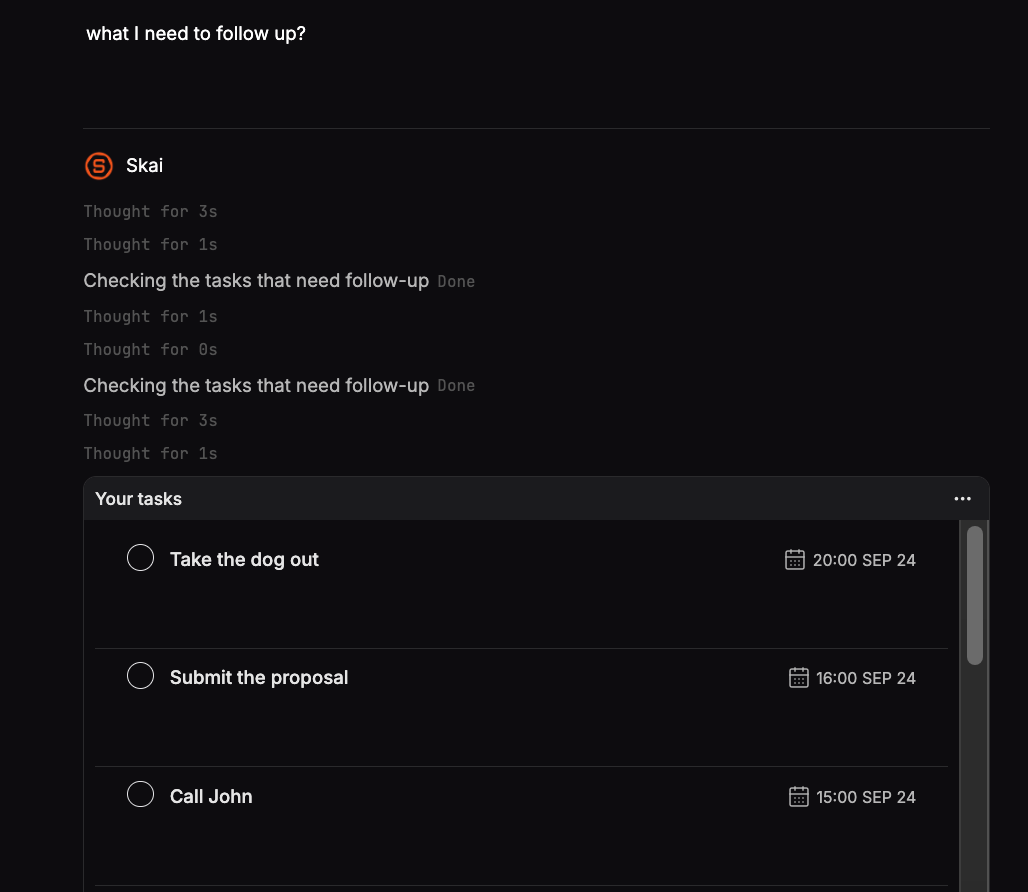
First, choose a tool that comes to you. A chat assistant waits for you to show up, which is exactly what you won't do when you're avoiding something. A proactive assistant sends a morning check-in or nudges you when a time block starts. This is the main reason I use Saner.ai for my own avoided tasks: it keeps notes, tasks, and calendar in one place and brings up what's due without me having to go looking for it. Any assistant that resurfaces tasks on a schedule will do a similar job
Second, build in self-forgiveness on purpose. This sounds soft. It isn't. In a study of 119 first-year university students, students who forgave themselves for procrastinating before their first midterm procrastinated less before the next one, and the researchers found that reduced negative feelings explained part of that effect.
So use this prompt in your weekly review:
Here are the tasks I planned and didn't do this week: [list]. Without judgment, tell me which ones to reschedule, which to shrink, and which to drop. Then write me one sentence I can say to myself that's kind but honest.
Yes, it feels a little silly to get a pep talk from a chatbot. Do it anyway. Our weekly review with AI guide shows how to fit this into a 15-minute Sunday habit.
Copy-paste prompt pack for procrastination

The "I'm stuck" prompt
I've been avoiding [task] for [time]. Ask me 3 quick questions to figure out what's blocking me, then give me a first step I can do in 5 minutes.
The "make it smaller" prompt
This first step still feels too big: [step]. Make it smaller. Keep going until it's something I could do while waiting for coffee.
The "just start" prompt
Give me a 10-minute plan for [task]. Minute by minute. The goal is to have started, not finished.
The "worst draft" prompt
Write a deliberately rough first draft of [thing]. Mark the parts I need to fill in with [brackets]. I'll fix it.
The "pattern check" prompt
Here are my tasks from the last month with how many times each was rescheduled: [list]. What patterns do you see in what I avoid? Be direct.
The "decide or delete" prompt
Should I do, delegate, shrink, or delete this task? [task + context]. Pick one and explain in two sentences.
Which AI tool fits which part of the problem?
You don't need five apps. You need the right one for your weakest step.
| Your main problem | What helps | Type of tool |
|---|---|---|
| Tasks are vague or huge | Task breakdown and clarifying questions | Any chat AI (ChatGPT, Claude, Saner.AI) |
| You forget avoided tasks exist | Proactive reminders and morning check-ins | Proactive AI assistant (e.g., Saner.ai) |
| No time on the calendar | Auto-scheduling tasks into free slots | AI calendar or scheduler (Saner.AI, Reclaim) |
| Scary emails and messages | Draft replies you can edit | AI email assistant |
| You lose momentum by Thursday | Weekly review and pattern spotting | Any assistant with access to your task history |
For deeper comparisons, see our reviews of the best AI personal assistants and best AI calendar assistants. If emails are the thing you avoid most, start with our guide on how to use AI to manage email.
Six mistakes that turn AI into a new way to procrastinate
I've made all of these. Some of them twice.
- Planning forever. If you've spent more time on your system than on the task, stop. Set a rule: the AI gets 5 minutes, then you start.
- Asking for a 20-step plan. Long plans feel productive and are terrifying to begin. Ask for step one only.
- Keeping plans in the chat. If the if-then plan isn't on your calendar or in your task app, it's gone by lunch.
- Letting the AI decide everything. It doesn't know your boss is moody on Mondays. You set priorities. It helps you act on them.
- Using shame as fuel. "Roast me for procrastinating" prompts are funny once. As a habit, they make the task feel worse, which is the whole problem.
- Switching tools every week. New app, new setup, new excuse. Pick one and give it two weeks.
When AI won't fix your procrastination
Sometimes the avoidance isn't about the task at all.
- The task conflicts with what you actually want. If you've avoided applying to a job for months, maybe you don't want that job. No prompt fixes a values mismatch.
- You're overloaded. If you have 60 tasks and time for 15, AI can help you choose, but it can't add hours to your day.
- Something bigger is going on. Persistent avoidance alongside low mood, constant worry, or trouble focusing across your whole life is worth raising with a doctor or therapist. If attention is the core struggle, our list of AI assistants for ADHD covers tools that help, but they work best alongside proper support.
Your action plan: do this in the next 24 hours

Don't read this and bookmark it. That's procrastinating on a procrastination guide, and it's a little too meta even for me.
- Tonight (10 min): Dump every avoided task into one list.
- Tonight (5 min): Paste the list into your AI with the "why am I avoiding this" prompt from Step 2.
- Tomorrow morning (10 min): Pick the one task that bugs you most. Ask for a first step under 10 minutes.
- Tomorrow morning (2 min): Turn it into an if-then plan and put it on your calendar.
- This Sunday (15 min): Run the forgiving weekly review prompt.
If you only do one thing, do the first step of the one task. Starting is the whole game.
FAQ
Can AI really help with procrastination?
Yes, for the practical causes. AI is good at making vague tasks clear, shrinking big tasks into small first steps, drafting scary messages, and reminding you at the right time. It can't make an unpleasant task pleasant, and it doesn't treat underlying anxiety, depression, or ADHD.
What is the best AI for procrastination?
The best AI for procrastination is one that reaches out to you, since avoided tasks are the ones you won't go looking for. A proactive assistant like Saner.ai, which combines tasks, notes, and calendar with check-ins, works well. For one-off task breakdowns, any chat AI such as ChatGPT or Claude is enough.
What's the best prompt to stop procrastinating?
Try: "I've been avoiding [task]. Ask me 3 questions to figure out what's blocking me, then give me a first step I can do in 5 minutes." It targets the reason you're stuck and ends with a tiny, specific action.
Is using AI to do my tasks just another form of procrastination?
It can be. If you're refining prompts instead of working, cap AI time at 5 minutes per task. Use it to start, then close the tab.
How do if-then plans help with procrastination?
If-then plans (implementation intentions) link a task to a specific trigger, like "when I sit down at 9am, I'll open the doc." A meta-analysis of 94 tests found they meaningfully improve goal attainment compared with general intentions. AI can write these for you in seconds.
Should I be worried about procrastination and my health?
Research has linked higher procrastination to later stress, anxiety, depression symptoms, and poorer sleep in university students, though that study shows association, not cause. If avoidance is affecting your mood or daily life, talk to a healthcare professional.
Theo Keene tests AI productivity tools for aiproductivityreview.com and still has at least one task he's been avoiding.



