TickTick vs Saner.AI: The Planner You Build or the Assistant That Sorts for You?

TickTick vs Saner.AI at a glance
TickTick | Saner.AI | |
|---|---|---|
Core idea | Feature-packed to-do list and planner | AI assistant across notes, email, calendar and tasks |
Free plan | Yes (9 lists, 99 tasks per list, 5 habits) | Yes |
Paid price | Premium US$49.99/year; US$4.99/month in the iOS app | Starter $8/mo, Standard $16/mo on the pricing page |
AI features | AI Voice Capture, Recording Summary, Nascent stage | Chat over notes and tasks, proactive daily plan, tasks pulled from email |
Notes | Basic notes inside lists | Full notes app with AI folders, tags and search |
Calendar | Built-in calendar views; Google Calendar and Outlook integration. A paid feature | Two-way Google Calendar sync; Outlook Calendar and Mail |
Not a mail tool | Gmail and Outlook Mail connectors | |
Focus tools | Pomodoro, habit tracker, countdowns, Eisenhower matrix, Kanban, timeline | Focus Box follow you around |
Platforms | iOS, Android, Windows, macOS, Linux, web, Apple Watch, Wear OS | Web, Chrome extension, iOS/iPadOS, Mac, Android |
Best for | People who like control and rituals | People drowning in inputs |
The real difference: who sorts the pile?
Every task manager answers one question. When a new thing lands on your plate, who decides where it goes?
In TickTick, you do. You type "send invoice to Lena friday 3pm," TickTick parses the date, and you pick the list and tag. It's fast. It's also on you, every single time.
In Saner.AI, the assistant does a first pass. It reads connected sources like Gmail or Outlook, pulls out tasks, and suggests a plan for the day. You review and fix. You still decide. You just start from a draft instead of a blank page.
Neither approach is "better." It depends.
- If most tasks start in your own head, TickTick's fast quick-add is hard to beat.
- If most tasks start in other people's messages, a tool that reads those messages saves you the copy-paste shuffle.
TickTick: what it does well
Where TickTick wins
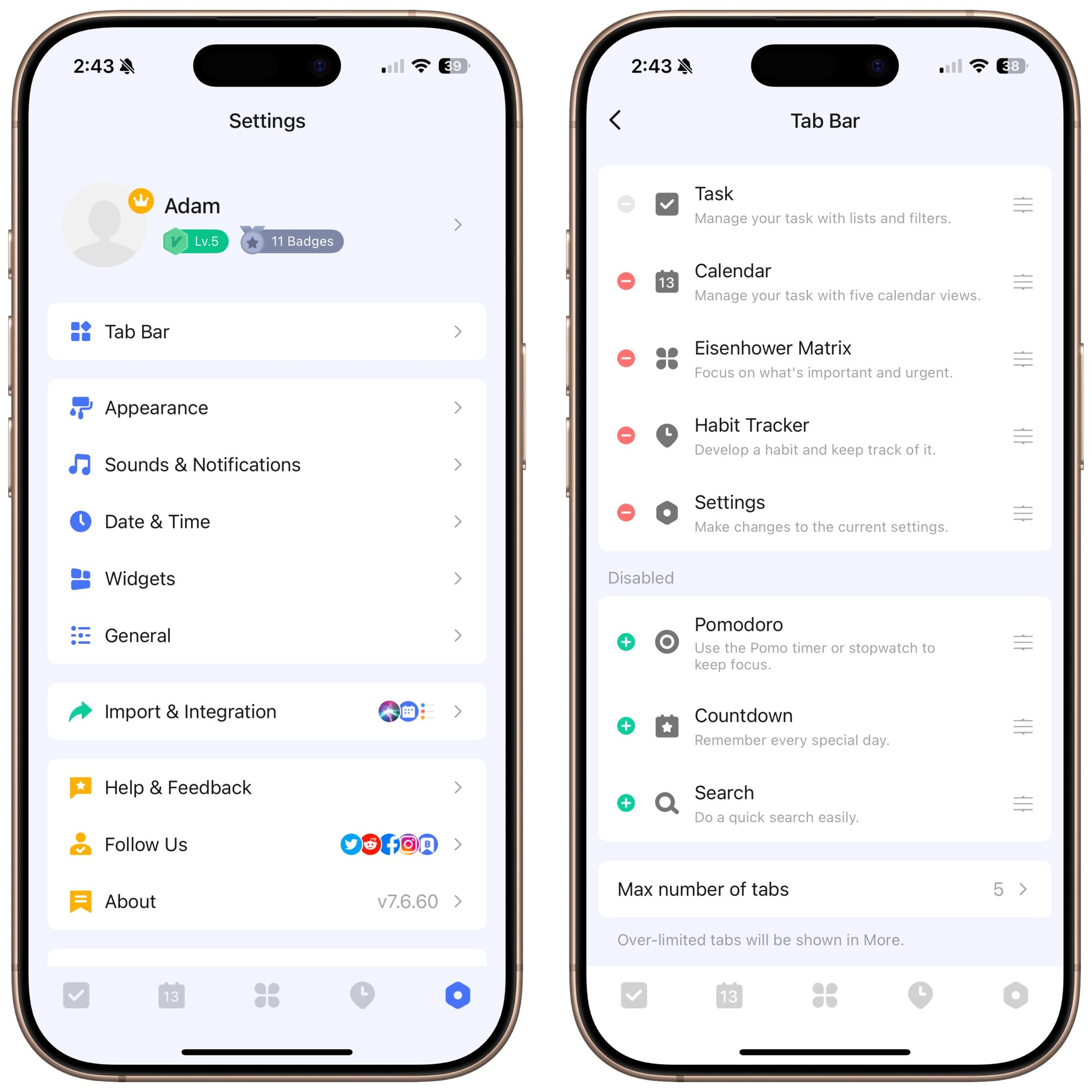
- Everything in one app. Tasks, calendar, Pomodoro timer, habit tracker and countdowns. Many people pay for three apps to get this.
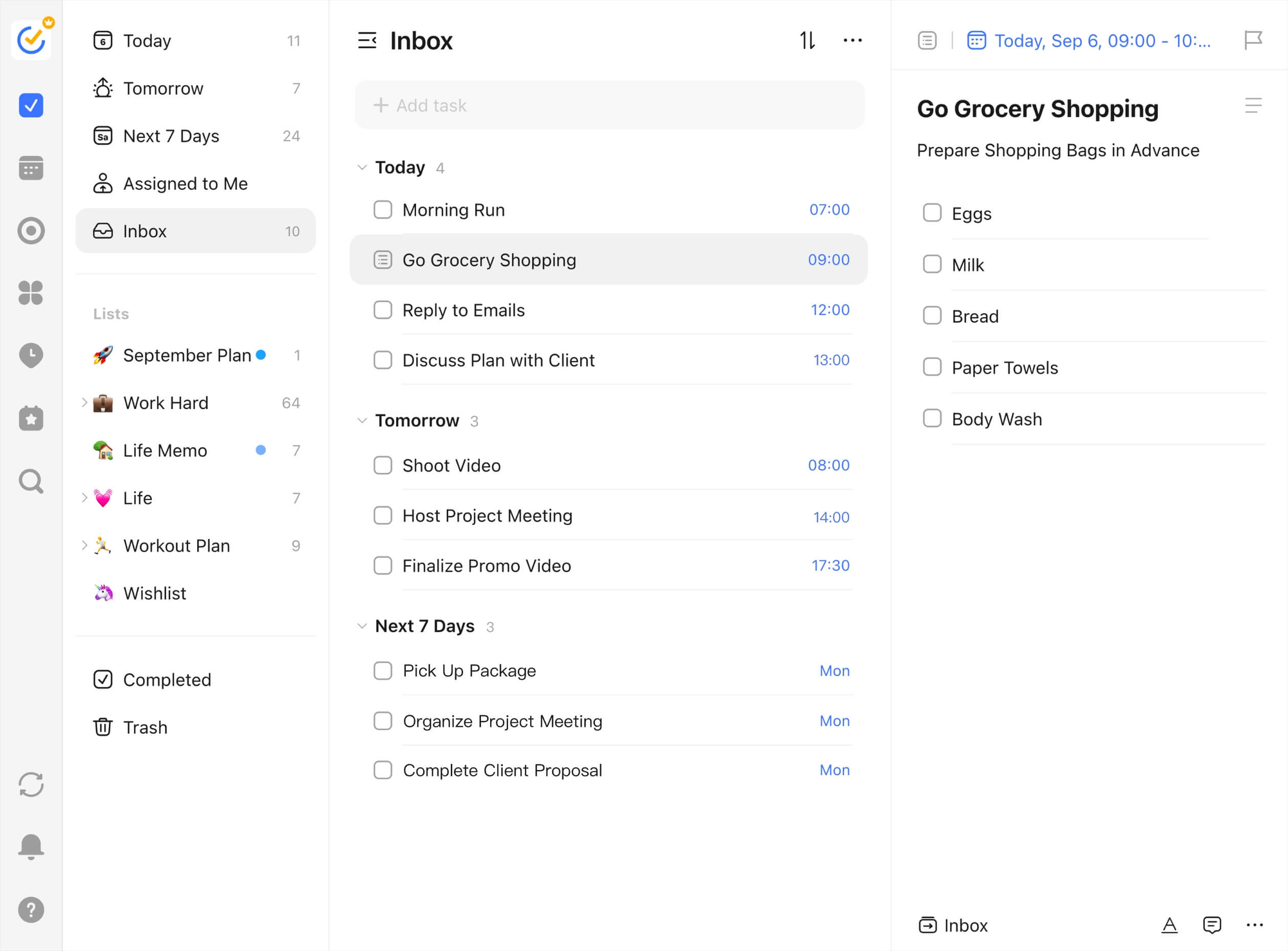
- Views for every brain. List, Kanban, timeline, Eisenhower matrix, and calendar views from year down to day.
- Natural-language input. Type or say a date in plain English and it lands on the right day.
- Platform coverage. iOS, Android, Windows, macOS, Linux, web, browser extension, plus Apple Watch and Wear OS
- Price. US$49.99 a year is about $4.17 a month.
- AI is arriving. TickTick now lists an AI Assistant, AI Voice Capture (several tasks from one spoken ramble), Recording Summary, and MCP support
Where TickTick falls short
- You're the sorting algorithm. The app doesn't read your email or Slack. If a client asks for a revision in a thread, you copy it in by hand.
- Notes are an afterthought. You can keep notes in lists, but there's no real knowledge base behind them.
- The AI is new and thin on docs. I couldn't find official launch dates or a clear breakdown of which AI features need Premium. Test it on the free plan before you count on it.
- Free plan limits bite. Nine lists and five habits sound fine until week two.
Saner.AI: what it does well
Saner.AI calls itself an "ADHD-friendly AI personal assistant for notes, email, and calendar". Its assistant is named Skai. Think of it as a to-do list that came with a reading habit.
Where Saner wins
- Tasks from email. Connect Gmail or Outlook and Saner pulls action items into your task list.
- Notes and tasks in one place. Capture through the Chrome extension, voice, or imports (Markdown, Obsidian, PDFs, images).
- Chat over your stuff. Ask "what did I promise the design team last week?" and Skai searches your notes with citations
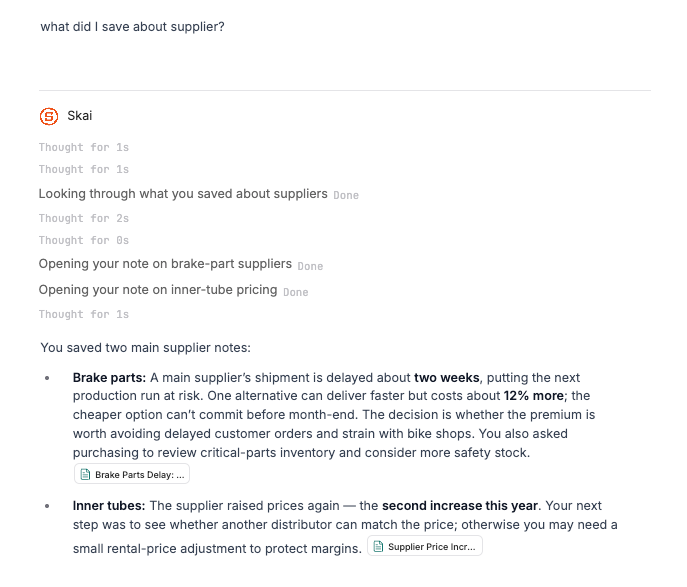
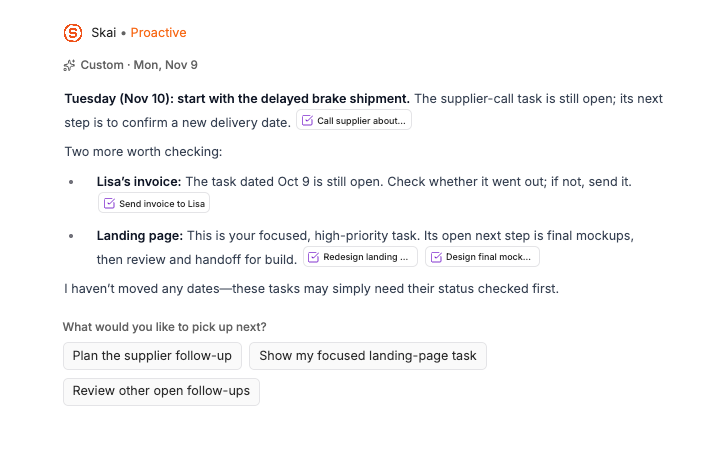
- A plan that shows up on its own. Skai Proactive sends a daily plan or summary, so you don't open the app to a blank day.
- Calendar that talks back. Two-way Google Calendar sync (November 2025 release note), plus Outlook Calendar and Mail. Task durations show up as blocks.
- Focus Box. It narrows the day to your top three. Small feature, big relief.
Where Saner falls short
- No Pomodoro, no habit tracker, no Kanban, no Eisenhower matrix.
- Not built for teams. Sharing works per note or folder. There's no team workspace plan.
- Fewer platforms. No Apple Watch app, and the Android app has fewer reviews and older updates than the iOS one.
Side-by-side: four everyday workflows
1. The overloaded inbox
You open your mail to 63 unread messages. Six of them contain real tasks.
In TickTick:
- Skim each email.
- Copy the task into the TickTick inbox with a date ("review deck thu").
- Drag it to the right list later. Or forget to.
In Saner.AI:
- Connect Gmail or Outlook once (Settings, then Connectors).
- Ask Skai: "What do I need to do from this morning's email?"
- Review the pulled tasks, fix the dates, delete the false alarms.
Winner: Saner.AI. This is the job it was built for.
2. The deep-work afternoon
You have three hours and one big task. You want a timer and no distractions.
In TickTick:
- Open the task and hit the focus icon.
- Run 25/5 Pomodoros. TickTick logs your focus time against the task.
- Check your focus stats later for that tiny dopamine hit.
In Saner.AI: Put the task in your Focus Box and block the time on your calendar. Then use a separate timer. Yes, really.
Winner: TickTick, with a slightly advantage
3. "Wait, what did we decide?"
Someone asks what you agreed with a client two weeks ago.
In TickTick: Search tasks. If you wrote the decision down as a task note, you'll find it. If it lived in an email, open your email.
In Saner.AI: Ask Skai. It searches your notes and connected sources, then answers with citations.
Winner: Saner.AI, as long as you've been capturing notes there.
4. Building habits and routines
You want to drink water, journal and take a 10-minute walk daily.
In TickTick: Add each as a habit, set a reminder, watch the streaks grow.
In Saner.AI: You can add recurring tasks, but there's no habit tracker or streaks.
Winner: TickTick.
Score: 2–2 🤷
Setup guides you can finish today
Set up TickTick in 20 minutes
- Create four lists only: Work, Personal, Errands, Someday. Resist the urge to make 15.
- Turn on Smart Lists for Today, Tomorrow and Next 7 Days.
- Connect your calendar in calendar settings so events show next to tasks.
- Add two or three habits max. More than that and the streak screen becomes a guilt screen.
- Set a default Pomodoro of 25/5, or 50/10 if you hate being interrupted.
- Pick a daily review time. Five minutes at 5 pm: clear the inbox, move leftovers to tomorrow.
Set up Saner.AI in 20 minutes
- Sign up on the free plan at saner.ai. It includes a trial bonus of extra AI requests.
- Connect one email account first (Gmail or Outlook). One source is easier to trust than five.
- Connect your calendar. Google syncs both ways, so tasks with durations appear as blocks.
- Install the Chrome extension and save one article or page to see how capture works.
- Brain dump into one note. Everything on your mind, messy is fine. Then ask Skai to turn it into tasks. (Here's a full brain dump with AI method.)
- Fill your Focus Box with three tasks for tomorrow.
- Let the proactive plan arrive the next morning. Edit it instead of building from scratch.
Who should pick which?

Choose TickTick if
- You enjoy designing your own system and tweaking it on Sundays.
- Pomodoro, habits and streaks keep you going.
- You want one low annual price and apps on every device, including your watch.
- Your tasks mostly start in your own head.
Choose Saner.AI if
- Your tasks show up in email, Slack and meetings, not in your head.
- You keep losing notes and decisions, not only tasks.
- You find a blank planner paralyzing and would rather edit a suggested plan.
- You have ADHD traits and want fewer menus. (My AI task managers for ADHD roundup covers more options.)
Final verdict
TickTick is the better planner. It's cheaper, runs everywhere, and its focus tools are excellent.
Saner.AI is the better assistant. It does the reading and sorting you'd otherwise do by hand, and it keeps your notes and tasks in the same brain.
Still unsure? Ask one question: do I lose time doing my tasks, or finding them? Doing → TickTick. Finding → Saner.
Want to see how Saner stacks up against other task apps? Try Todoist vs Saner.AI or our tested list of the best AI task managers. And if your real problem is the morning, start with how to plan your day with AI.
FAQ
Is TickTick better than Saner.AI?
For classic planning, yes. TickTick has Pomodoro, habits, Kanban and an Eisenhower matrix, and Premium costs US$49.99 a year. Saner.AI is better if your tasks come from email, Slack and notes, because it pulls them out and plans your day for you.
Does TickTick have AI?
Yes. TickTick's site lists an AI Assistant, AI Voice Capture, Recording Summary and MCP support. It doesn't clearly say which of these need Premium, so test them on the free plan first.
How much does Saner.AI cost?
There's a free plan. The pricing page lists Starter at $8 a month and Standard at $16 a month, with a yearly discount toggle. The US App Store lists $12 and $20, which looks like month-to-month billing. Prices checked 9 November 2026.
Can Saner.AI replace TickTick?
Only if you don't rely on Pomodoro, habit streaks. Saner has a task list, calendar sync and a Focus Box for your top three tasks, but none of those focus rituals.
Does TickTick sync with Google Calendar and Outlook?
TickTick lists Google Calendar and Outlook as calendar integrations, and Premium users can subscribe to third-party calendars. Saner.AI syncs two-way with Google Calendar and connects to Outlook Calendar and Mail.
Which is better for ADHD?
It depends on what trips you up. If you lose tasks in messages and freeze at a blank planner, Saner.AI's auto-extracted tasks and suggested daily plan help more. If you need timers and streaks to start, TickTick helps.