The 4 Best AI Task Manager for ADHD,Tested & Ranked
💡 Quick answer: If your scattered notes and to-dos never become an executable schedule, Saner.ai bridges that gap by slotting thoughts straight onto your calendar. If you freeze at big, overwhelming tasks, the free Goblin Tools breaks them down into tiny, actionable steps. If time blindness is your biggest hurdle, Tiimo makes the day tangible by turning schedules into a visual timeline. If quick ideas slip away before you write them down, Todoist offers unmatched rapid capture.
What makes a task manager work for ADHD?
I tested each tool against six questions. Consider these for your own shortlist:
- Capture friction: How many seconds from "I just thought of something" to "it's saved"? Every extra tap is a chance to lose the thought.
- Decide-for-me power: Does it help answer "what do I do next?" or does it just show you 47 things?
- Visible time: Does it make duration and deadlines something you can see, not just read?
- Gentle failure: What happens after a bad week? A wall of red overdue tasks is a great way to make people quit.
- Setup cost: How much configuration before it's useful? Setup is a tax, and it's paid on your worst days.
- Notification honesty: Does it nudge you, or does it nag you into ignoring it?

1. Saner.ai: best for turning captured thoughts into a scheduled plan
For a lot of ADHD brains, the breakdown happens earlier: the thought shows up in the shower, in a voice memo, or in an email you half-read, and it never becomes a task at all.
Saner.ai is built around that earlier step. It combines notes, tasks, email, and calendar in one place, driven by an AI assistant called Skai, and it leans into three things:
- Voice to calendar: Talk to it, forward a messy email, or dump any thought. The AI works out the intent, splits anything vague or oversized into steps, and puts the result on my calendar instead of leaving it as a note I must remember to revisit.
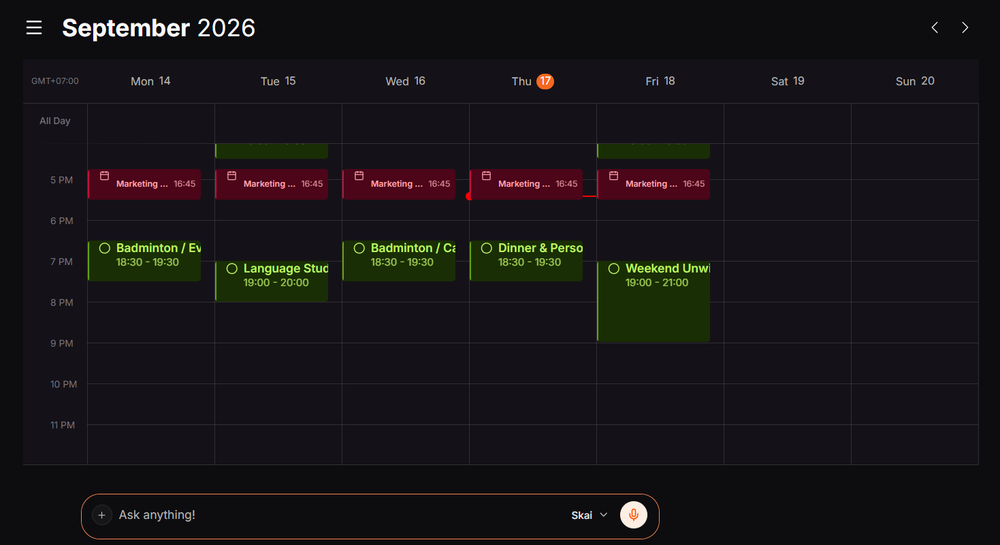
- Proactive planning: Instead of opening a blank day and deciding what goes where, I get a draft plan built from my notes, inbox, and unfinished items, so I'm editing rather than starting from zero.
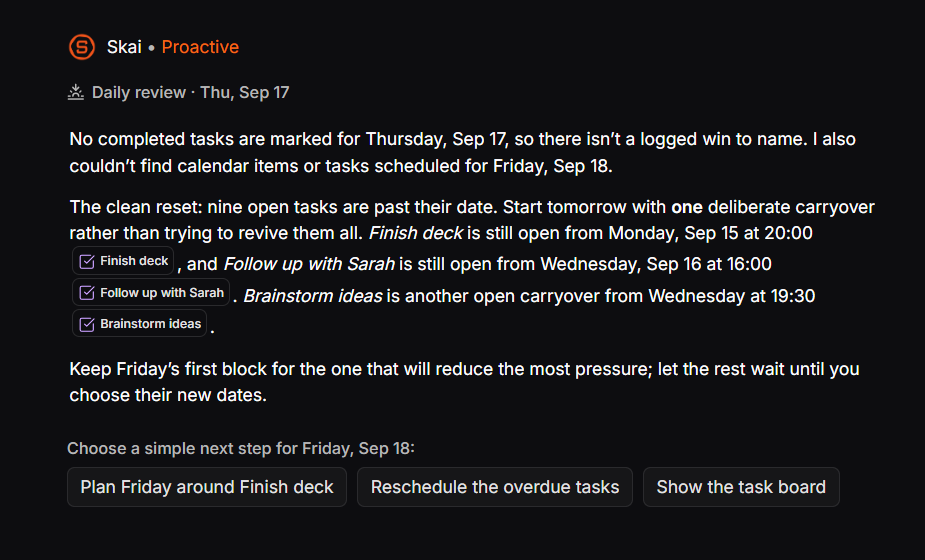
- Price: Free plan; paid tiers from $8/month (Starter) to $16/month (Standard)
- Best for: For people whose main struggle is quick capture and daily planning- not managing an inbox or automating complex business tasks. A simpler, calmer app works far better here, especially for ADHD minds dealing with time blindness and daily overwhelm.
- Trade-off: It's a younger product with a smaller public review base than Todoist or Motion, and it's not a team project-management tool. Also, a proactive assistant is only useful if you review its draft plan, so decide when you'll do that.
For a broader comparison beyond task managers, see my roundup of the best AI assistants for ADHD.
2. Goblin Tools: best free option for task paralysis
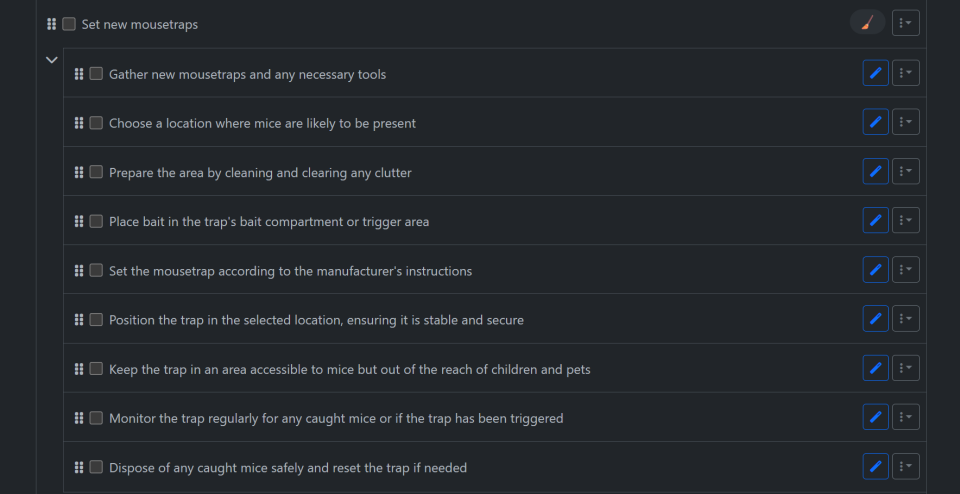
Goblin Tools is a small set of free web tools built with neurodivergent users in mind. Its flagship, Magic ToDo, takes a vague task like "clean the kitchen" and breaks it into specific subtasks, with a setting for how granular you want it.
- Price: Free on the web
- Best for: Getting started when a task feels like a brick wall
- Trade-off: It breaks tasks down but doesn't schedule, remind, or track anything.
- Try this: Paste in the task you've been avoiding, ask for the smallest steps, and do only step one.
What it does best:
- Instant brain-dump to task list: The Compiler tool takes a chaotic, unformatted paragraph of weekend chores and converts it straight into an organized, reorderable checklist.
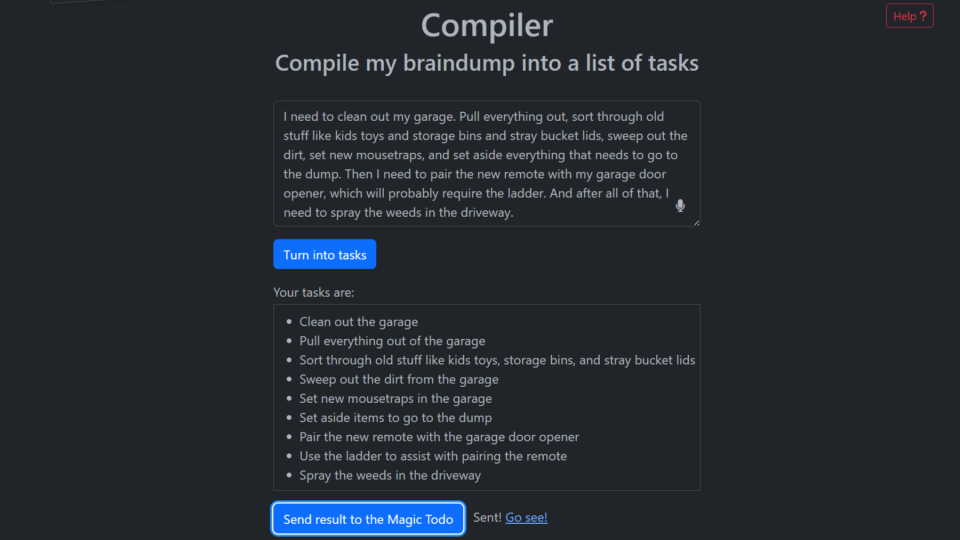
- One-click step-by-step breakdown: Clicking the magic wand button automatically generates clear, sequential subtasks for vague to-dos.
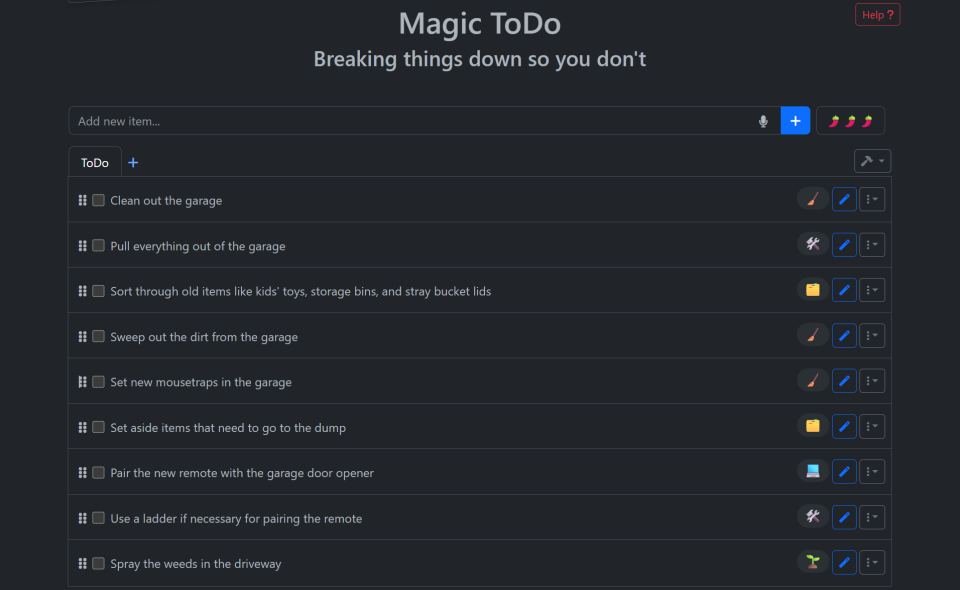
- Multi-layer nested breakdowns: Hit the magic wand again on any subtask to break it down even further into granular, micro-steps.
- No chatting or prompt engineering: Do not need to chat back and forth, manage follow-up questions, or write perfect prompts; I just paste text and click.
- Built specifically for neurodivergent minds: Purpose-built for people struggling with executive dysfunction, ADHD, anxiety, or burnout without overwhelming them with menus.
- Zero friction to use: Completely free in the browser with no accounts, logins, or paywalls blocking me from getting help right away.
Where it falls short:
- No scheduling or reminders: It only breaks tasks down; it cannot slot to-dos onto a calendar, set deadlines, or send alerts.
- Zero progress or project tracking: It lacks kanban boards, dependencies, recurrent tasks, and long-term workspace storage so completed items just disappear.
- Single-task sidekick, not a system: Still need a primary calendar or task manager (like Sunsama, Saner.ai, or Todoist) to actually plan and manage my life.
- No context awareness: It doesn't read my inbox, files, or notes; each prompt starts from scratch with whatever text I paste in.
3. Tiimo: best for making time visible
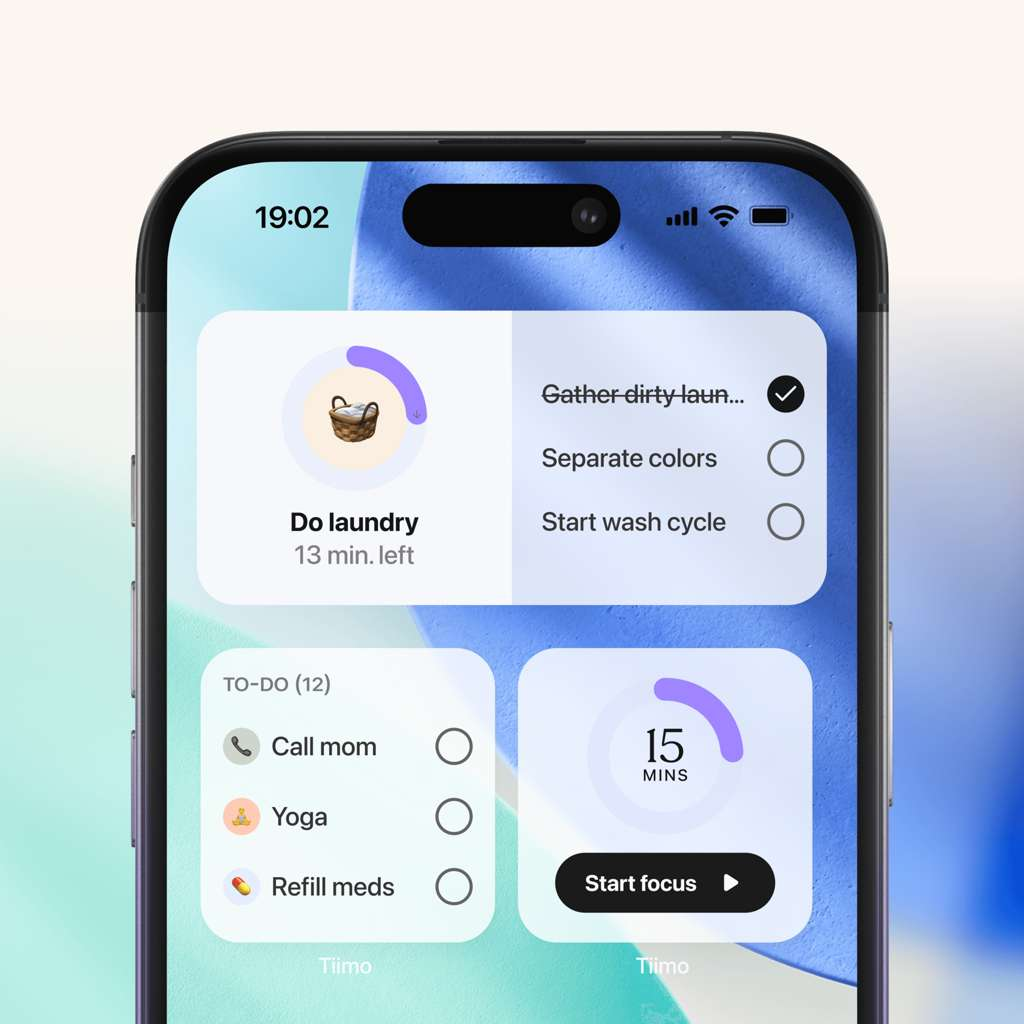
Tiimo shows my day as a colorful visual timeline with icons and timers instead of a grid of text, and its AI can turn spoken or typed thoughts into a plan with time estimates.
- Price: Free tier with a basic planner, to-dos, and focus timer (limited AI). Pro adds AI task breakdown and the web planner. The latest review I found lists roughly $8/month or $80/year, while others quote less, so confirm the in-app price.
- Best for: People who need to see the day shrinking rather than read a list
- Trade-off: It plans days and routines, not projects. Many people pair it with a separate task manager.
What it does best:
- Visualizes time shrinking: Replaces anxiety-inducing digital countdowns and dense text lists with an intuitive visual timeline and colored circular arcs that visibly deplete as time passes.
- Low-pressure, non-judgmental AI Co-Planner: Listens to messy, typed, or spoken brain-dumps, breaking them into bite-sized steps with realistic time estimates and rescheduling days without guilt, nagging, or shame.
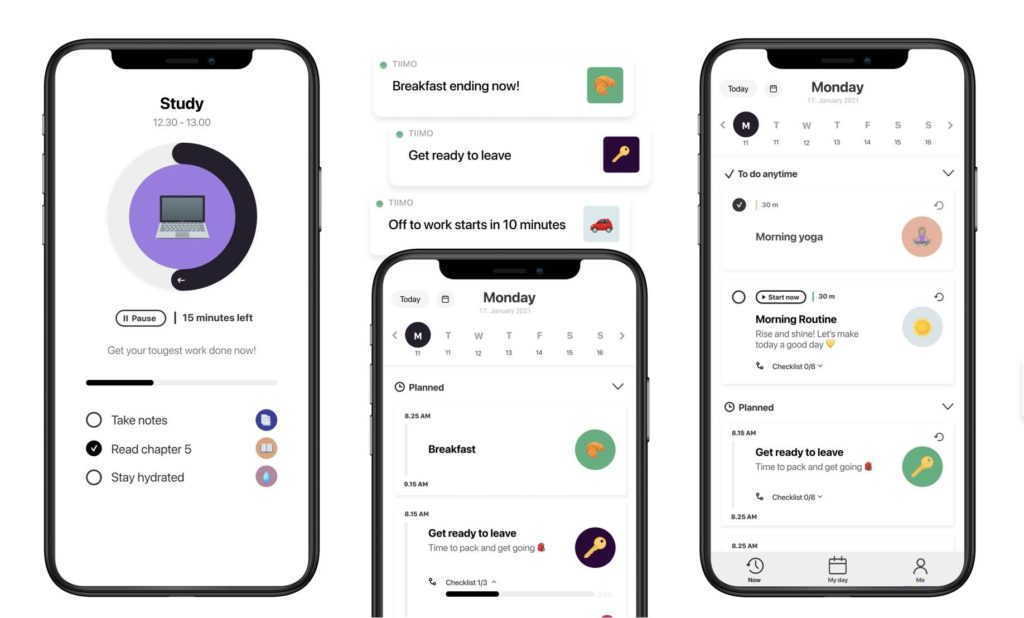
- Reduces executive function friction: Single-tap home screen widgets, customizable color-coded icons, and balanced 30-minute focus blocks make starting and transitioning between tasks easier.
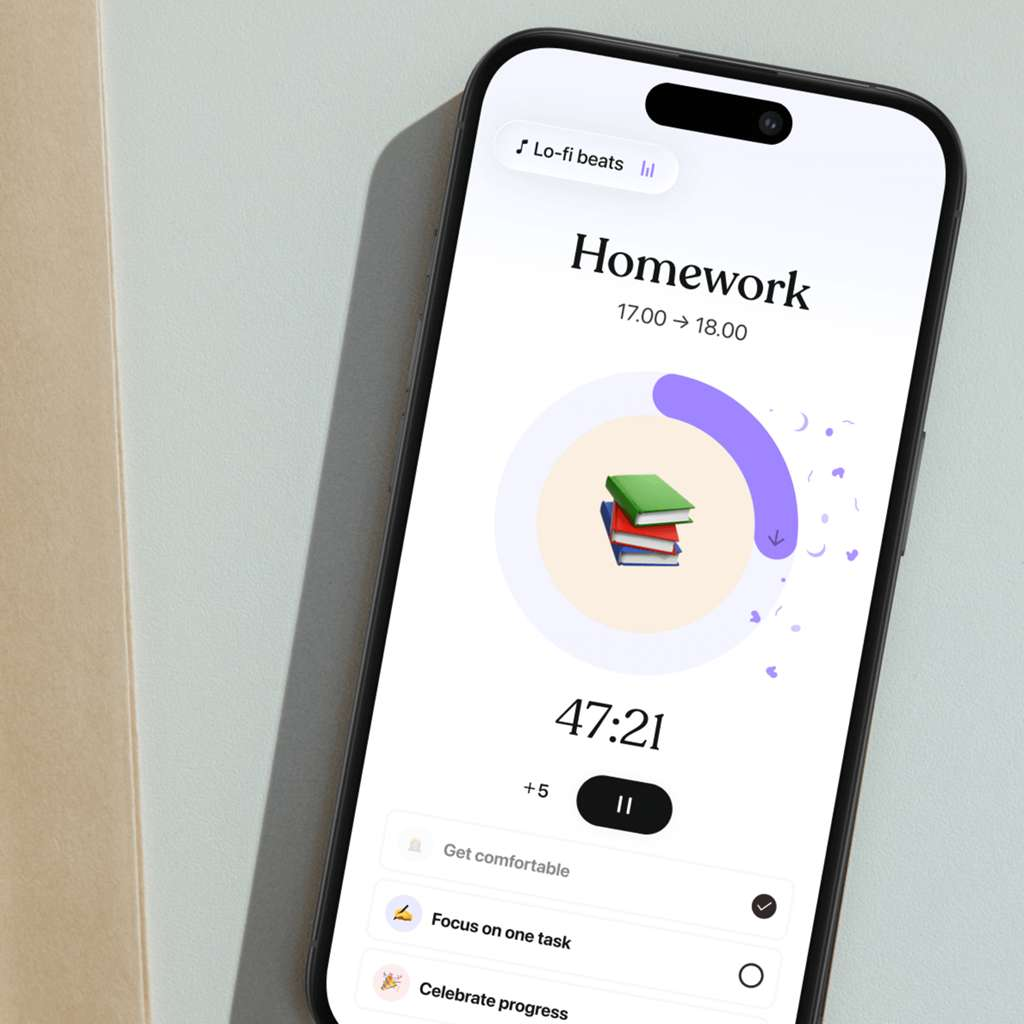
- Mindful habit & mood reflection: Integrates post-activity mood logging to help neurodivergent users spot patterns between daily routines, mental energy, and burnout.
Where it falls short:
- Plans routines, not projects: Built around day-to-day habit flows rather than complex task dependencies, kanban boards, sub-project hierarchies, or team collaboration.
- Requires a paired task manager: Because it lacks deep project tracking or an extensive backlog inbox, you will likely need to pair it with a separate tool like Todoist, Notion, or Asana.
- Less flexible for rapidly shifting days: Moving several scheduled blocks on the fly when unexpected disruptions happen throughout a workday can feel clunky compared to automated re-planners.
- Key AI features gated behind Pro: Advanced AI task breakdowns and full web access require a paid subscription, which may feel steep if you only need basic time-tracking.
4. Todoist: best for fast, low-friction capture
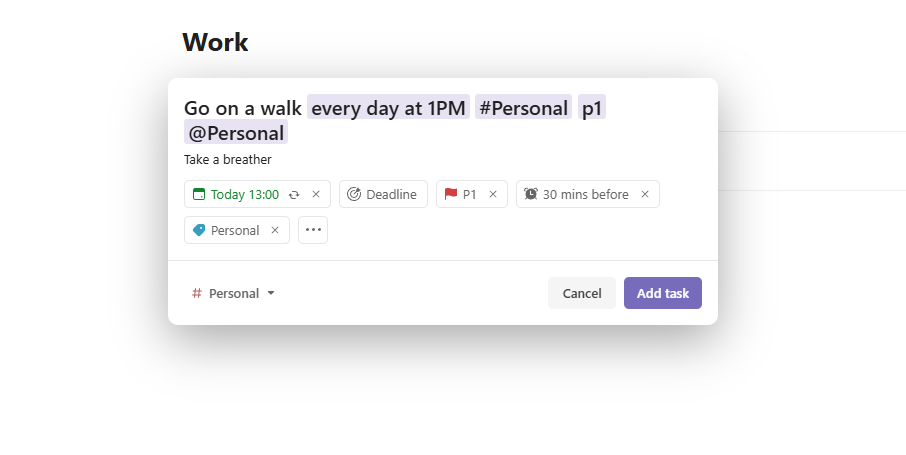
Todoist's superpower is speed. Type "email the accountant Friday at 2" and it parses the date and time. Its AI can break a task into subtasks, and the free plan handles everyday personal use.
- Price: Free Beginner plan; Pro is about $5/month billed annually ($7 monthly)
- Best for: Catching a thought in two seconds, before working memory drops it
- Trade-off: It relies on you to organize and schedule. Skip a few days and the overdue pile can feel like a scolding. Use the Today view and reschedule aggressively.
What it does best:
- Flawless natural language input: Type due dates and repeat cycles casually (like "every third Thursday at 2pm" or "tomorrow morning") and parses them instantly into accurate schedules.
- Seamless cross-platform sync & offline mode: Has dedicated, polished apps across virtually every desktop and mobile platform that sync reliably in real time and let me work fully offline without losing changes.
- Clean, clutter-free interface: Offers an intuitive balance between minimalist to-do lists, kanban boards, and customizable filter views without feeling bloated.
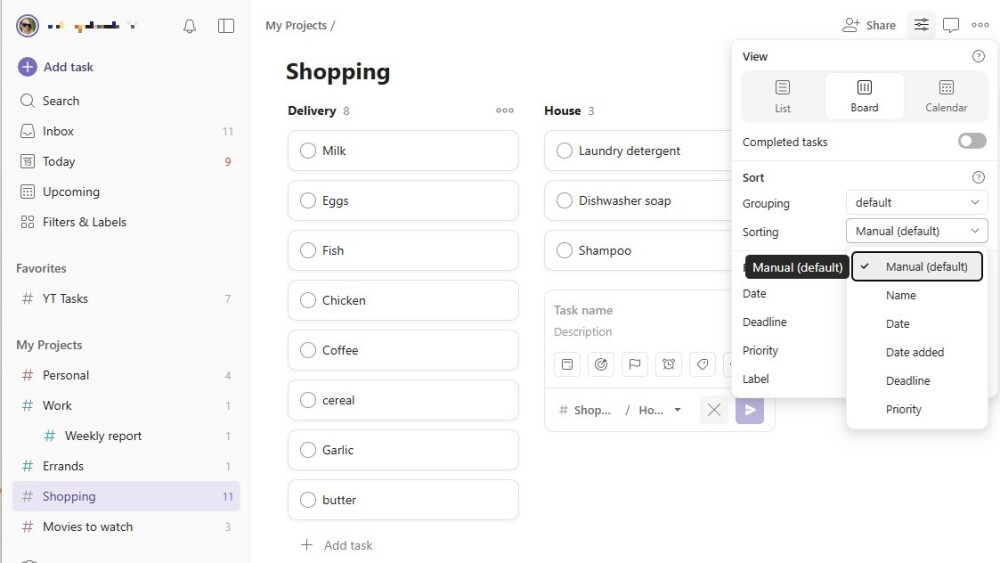
- Lightweight collaboration: Makes it remarkably easy to share individual projects, assign tasks to others, and delegate responsibilities for both personal and small-team work.
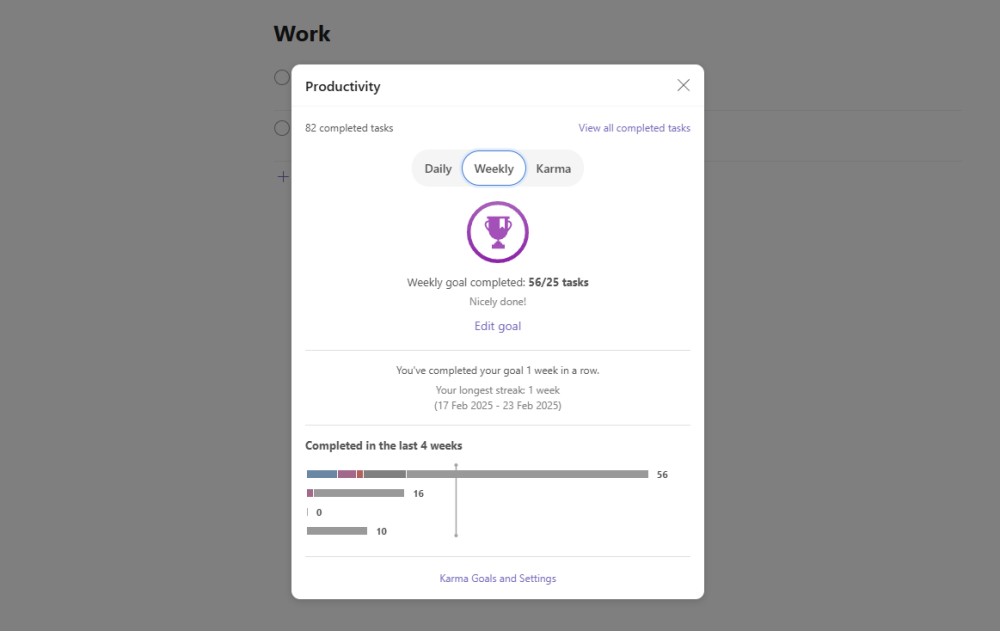
- Gamified productivity tracking: Features Todoist Karma and visual activity trends to help me maintain daily streaks and track completed tasks over time.
Where it falls short:
- Core essentials locked behind paid tiers: Basic necessities like custom task reminders, full calendar layouts, task durations, and extended activity history are withheld from the free plan.
- Light on true auto-scheduling: It tracks due dates and deadlines, but it won't automatically time-block or actively rearrange your day around calendar conflicts like dedicated AI schedulers
- Limited for complex project management: Lacks native Gantt charts, advanced dependency tracking, and granular project permissions required for enterprise dev teams (who are better served by Asana or Jira).
- Restricted free tier project limits: Free accounts cap you at only five active personal projects and three custom filters, which power users will outgrow quickly.
Comparison between Goblin Tools, Tiimo, Todoist, Saner.ai
| Tool | Free plan | Helps most with | Starting price | Watch out for |
| Goblin.tools | Yes (free) | Getting started on big tasks | Free | Doesn't schedule or track |
| Tiimo | Yes (limited) | Seeing time visually | Free / Pro paid | Days, not projects |
| Todoist | Yes | Fast capture | ~$5/month (Pro) | Overdue pile if you don't reschedule |
| Saner.ai | Yes | Capture to calendar, proactive planning | $8/month | Newer, smaller review base |
A 20-minute setup you can do today
Pick one tool from above. Then:
- Minutes 0-5, brain dump. Get everything out of your head into one inbox. Don't organize. Just dump. There's research support for the idea that unfinished goals nag at us and that making a specific plan quiets that effect, though it was studied in general samples, not ADHD specifically (Masicampo & Baumeister, 2011, Journal of Personality and Social Psychology).
- Minutes 5-10, shrink. Pick the top three tasks and make each one tiny (or let Goblin.tools or the tool's AI do it). "Write report" becomes "open the doc and write the title."
- Minutes 10-15, place. Put those three on today's calendar with a rough time each, and pad your estimates. Most of us guess low.
- Minutes 15-20, set one guardrail. Choose one recurring time (say, 5 minutes after lunch) to check your plan. If you only build one habit, build that one.
- Next week, judge honestly. Did you open it on bad days? If not, the tool is too heavy. Switch, don't blame yourself. For more, see how to plan your day with AI and my guide to AI for task management.

Five mistakes that kill a new task system
I've made every one of these, so consider this a friendly intervention rather than a lecture.
- Importing your whole life on day one. A 400-item backlog isn't a task list, it's a haunted house. Start with today plus this week, and archive the rest somewhere you can ignore it.
- Building categories before you have habits. Tags, labels, and color codes feel productive. They're also the most common way to turn a quick capture tool into a second job. Add structure only when you feel real pain without it.
- Trusting your time estimates. Most people guess low, and if your tool schedules from those guesses, your day is over-full before it starts. Add a buffer, then look at how long things actually took and adjust.
- Leaving every notification on. If everything pings, nothing does. Keep one daily check-in and one alert for true deadlines, and mute the rest.
- Treating a missed day as a failed system. Missing days is normal. What matters is how cheap it is to get back in. Before you commit to any tool, ask: "Can I restart this in under two minutes after a rough week?" If the answer is no, pick something lighter.
One more practical note: whichever tool you choose, give it a real trial. Two weeks of ordinary life, including at least one chaotic day, tells you far more than a tidy demo afternoon ever will. The best system on this list is the one you're still opening in week three.

Which AI task manager should you pick?
- You freeze at big, vague tasks: Goblin.tools
- Time feels invisible: Tiimo
- You lose thoughts before they're saved: Todoist for speed, or Saner.ai if you'd rather talk than type
- Thoughts never become scheduled plans, and you want a draft day waiting for you: Saner.ai
- You want the broader landscape: my best AI task manager roundup compares tools beyond the ADHD lens
FAQ
What is the best AI task manager for ADHD? It depends on where you get stuck. Saner.ai suits turning captured thoughts into a calendar plan, Goblin.tools suits task initiation, Tiimo suit time visibility, and Todoist suits fast capture
Can an AI task manager treat ADHD? No. These tools are accommodations that reduce friction. The strongest trial evidence I found for skills-based support is for cognitive behavioral therapy delivered by clinicians (Safren et al., 2010), not for consumer apps. If ADHD affects your daily life, talk to a qualified healthcare professional.
Are there free options? Yes: Goblin.tools is free, and Todoist, Tiimo, and Saner.ai all have free tiers.
What about "time blindness"? It's popular shorthand. Research does find timing differences in ADHD, mainly in short-interval lab tasks (JAACAP, 2021), so visual timers and time estimates are reasonable to try, but the research doesn't promise they'll fix real-world lateness.
Is auto-scheduling better than manual planning? Not universally. Auto-schedulers remove the "what next?" decision, but they need accurate inputs and can feel chaotic. Manual planners give control but demand daily effort. Test whichever fails you less on your worst day.
Related reading: best AI task manager, best AI assistants for ADHD, and best AI calendar assistants. This article is for information only and isn't medical advice.



