How I Brain Dump With AI


It's 11:40 p.m. You're lying in bed and your brain has decided now is the perfect time to remind you about the dentist, the invoice, the birthday gift, the weird noise the car makes, and that email you "read" on Tuesday.

None of these are urgent. All of them are loud.
The fix people have recommended for decades is the brain dump: get everything out of your head and onto a page. It works. The part that never worked for me was what came after, when I'd stare at a page of chaos and think, "Great, now I have to organize this too." 🫠
That second half is where AI earns its keep. This guide shows you how to brain dump with AI, step by step, with the prompts I use, the mistakes I made, and a worked example you can copy tonight.
The Key answer
To brain dump with a general LLM, you capture every open loop in your head as fast and messily as possible, then ask an AI to sort that raw list into clear next actions, group them, flag what's urgent, and drop the rest into a "later" pile. -> the whole process takes around 15 mins
To brain dump with AI better, try dedicated tool like Saner.ai -> the whole process takes around 1 minute
What is a brain dump, exactly?
A brain dump is a timed session where you write down every task, worry, idea, and half-remembered obligation that's rattling around your head. No order. No formatting. No judging.
The goal isn't a pretty list. The goal is an empty head.
Why bother? Two reasons, and both have research behind them.
Your working memory is small
Cognitive psychologist Nelson Cowan's review of working memory research puts the central storage limit at roughly 3 to 5 meaningful items in young adults (Cowan, 2010, Current Directions in Psychological Science). Three to five. You are currently trying to hold about 40.
Unfinished tasks nag you, and a plan quiets them
In a set of experiments published in the Journal of Personality and Social Psychology, Masicampo and Baumeister found that unfulfilled goals caused intrusive thoughts during an unrelated reading task and worse performance on an unrelated anagram task. When participants made a specific plan for how, when, and where they'd handle the goal, those effects went away, even though the goal itself was still unfinished (Masicampo & Baumeister, 2011).
You don't have to finish the thing to get it out of your head. You have to decide what happens next.
A brain dump gets things out. AI helps you get to the "what happens next" part fast, before you give up and go scroll.
Brain dump may even help you fall asleep
If you're a nighttime dumper, there's a nice bonus. In a Baylor University sleep-lab study, 57 adults aged 18 to 30 spent five minutes before bed writing either a to-do list or a list of things they'd already completed. The to-do list group fell asleep significantly faster (about 9 minutes faster on average), and the more specific their to-do lists were, the faster they fell asleep (Scullin et al., 2018, Journal of Experimental Psychology: General; numbers summarized by Live Science).
Why AI makes brain dumps actually useful
Classic brain dumps have one big flaw: the output is a mess, and messy lists don't get used.
Here's what a raw dump looks like when I do it honestly:
- dentist??
- Q4 deck
- mom bday: gift? card? both?
- that thing Sarah said about the vendor
- cancel the free trial before it charges me
- learn Spanish (again)
- car noise
Some of these are tasks. Some are projects. "Learn Spanish (again)" is a lifestyle fantasy. "That thing Sarah said" isn't even a sentence.
Sorting this by hand is tedious, and tedious is exactly when I quit. An AI assistant is very good at the boring middle layer:
- Rewriting vague items as next actions. "Dentist??" becomes "Call Dr. Lin's office to book a cleaning."
- Spotting projects hiding as tasks. "Q4 deck" is five tasks wearing a trench coat.
- Grouping. Calls together, errands together, computer stuff together.
- Flagging deadlines. "Cancel the free trial" probably has a date attached, and the AI will ask.
- Parking the dreams. "Learn Spanish" goes to a someday list instead of guilt-tripping you daily.
What AI is bad at: knowing what matters to you. It doesn't know your boss is touchy about the Q4 deck or that your mom will genuinely be hurt without a card. You keep the judgment. It does the grammar.
If you want the bigger picture of where this fits, I cover the full capture → clarify → schedule → execute → review system in my guide to using AI for task management. The brain dump is the capture layer, on steroids.
How to brain dump with AI: the 5-step method
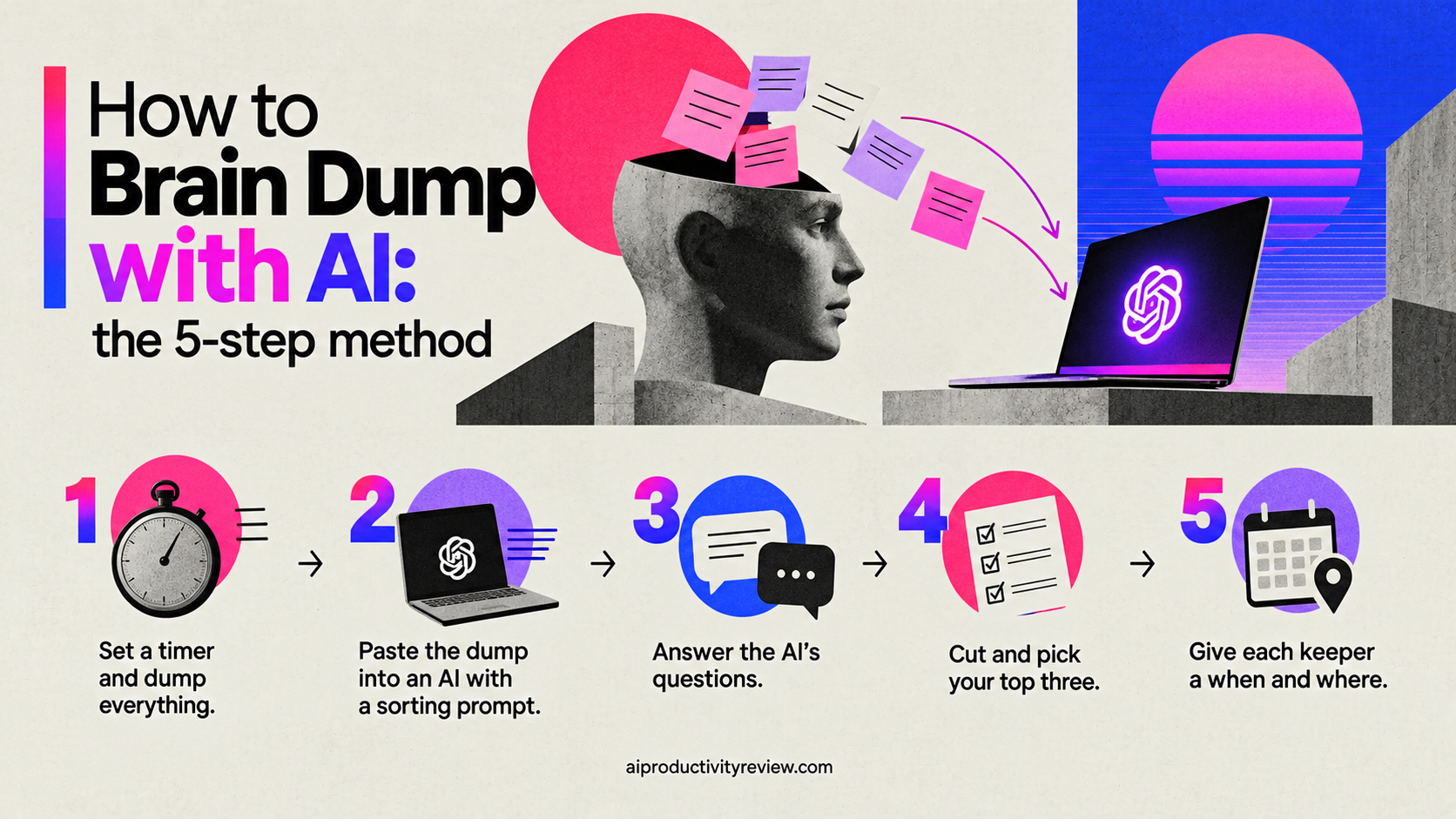
Step 1: Set a timer and dump everything (5 minutes)
Pick one place to dump. Notes app, a blank doc, a voice memo, a chat window with your AI. Doesn't matter. What matters is speed.
Rules for the dump:
- No editing. Typos are fine. Half-words are fine.
- No sorting. If you start grouping, you'll slow down and your brain will start "being reasonable" and hiding things.
- Include worries and ideas, not just tasks. "Worried the landlord will raise rent" counts.
- Use prompts if you stall. Scan these categories: work projects, emails you owe, money stuff, home, health appointments, people you need to reply to, errands, things you promised someone.
- Stop when the timer ends, or when you've gone a full minute without adding anything.
Voice tip: If typing feels like too much (some days it does), talk it out. Open your phone's voice notes or your AI's voice mode, and ramble. Also, Saner.AI is good at pulling tasks out of a rambly transcript and turn that into a task list
Step 2: Paste the dump into an AI with a sorting prompt (3 minutes)
Give it a job description. Here's the prompt I use:
Here's a raw brain dump. Please:Rewrite every actionable item as a single, specific next action starting with a verb.If an item is really a multi-step project, label it PROJECT and list only the first next action.Group items by context: Calls, Computer, Errands, Home, Waiting On Someone.Flag anything that sounds time-sensitive and ask me for the deadline if you can't tell.Move vague goals and "someday" ideas into a separate list called Later.Put worries that aren't tasks into a list called Not Tasks.Don't invent tasks I didn't mention. If something is unclear, ask me one question about it.
Here's the dump: [paste]
Step 3: Answer the AI's questions (2 minutes)
A good assistant will come back with a couple of clarifying questions. "When does the free trial end?" "What was Sarah's comment about the vendor?"
Answer them quickly. If you don't know, say "unknown, add a task to find out." That's a real next action too.

Step 4: Cut and pick your top three (3 minutes)
Now you look at the sorted list with fresh eyes. This is your job, not the AI's.
- Delete anything that doesn't need doing. Seeing a task written clearly is often what makes you realize it's pointless.
- Delegate anything someone else should do. Move it to Waiting On with a name.
- Pick three things for tomorrow. Not twelve. Three.
If you struggle to choose, ask the AI to help you rank, but give it your criteria ("I care most about deadlines this week and anything blocking a teammate").
>> I go deeper on ranking methods in how to prioritize tasks with AI.
Step 5: Give each keeper a when and where (2 minutes)
Remember the Masicampo and Baumeister finding. The relief comes from a plan, which means a when and a where.
This lines up with research on implementation intentions, the "if-then" plans psychologists study. A meta-analysis of 94 studies by Gollwitzer and Sheeran found that forming these plans had a medium-to-large effect on reaching goals (d = .65), including on the classic problem of never getting started (summarized by the U.S. National Cancer Institute).
So for each of your top three, write:
- When: "Tuesday, 9:00 a.m."
- Where: "At my desk, before opening email."
- If-then (optional): "If I finish the standup early, then I call the dentist."
Then put them somewhere you'll actually see: your calendar, your task manager, a sticky note on the laptop.
>> An AI calendar assistant can time-block these for you automatically; I compare the options in my roundup of the best AI calendar assistants.
That's it. Head empty. Plan made. Go to bed. 🛏️
A worked example: a typical night dump
Here's what this looks like end to end, using saner.ai
The raw dump (voice around 45s):
reply to Marco re: contract, Q4 deck ugh, dentist, mom bday is the 14th, gift?, cancel streaming trial, car noise front left, Sarah vendor thing, renew passport??, gym, write the newsletter, fix the bathroom fan, learn Spanish, taxes folder, feel behind on everything
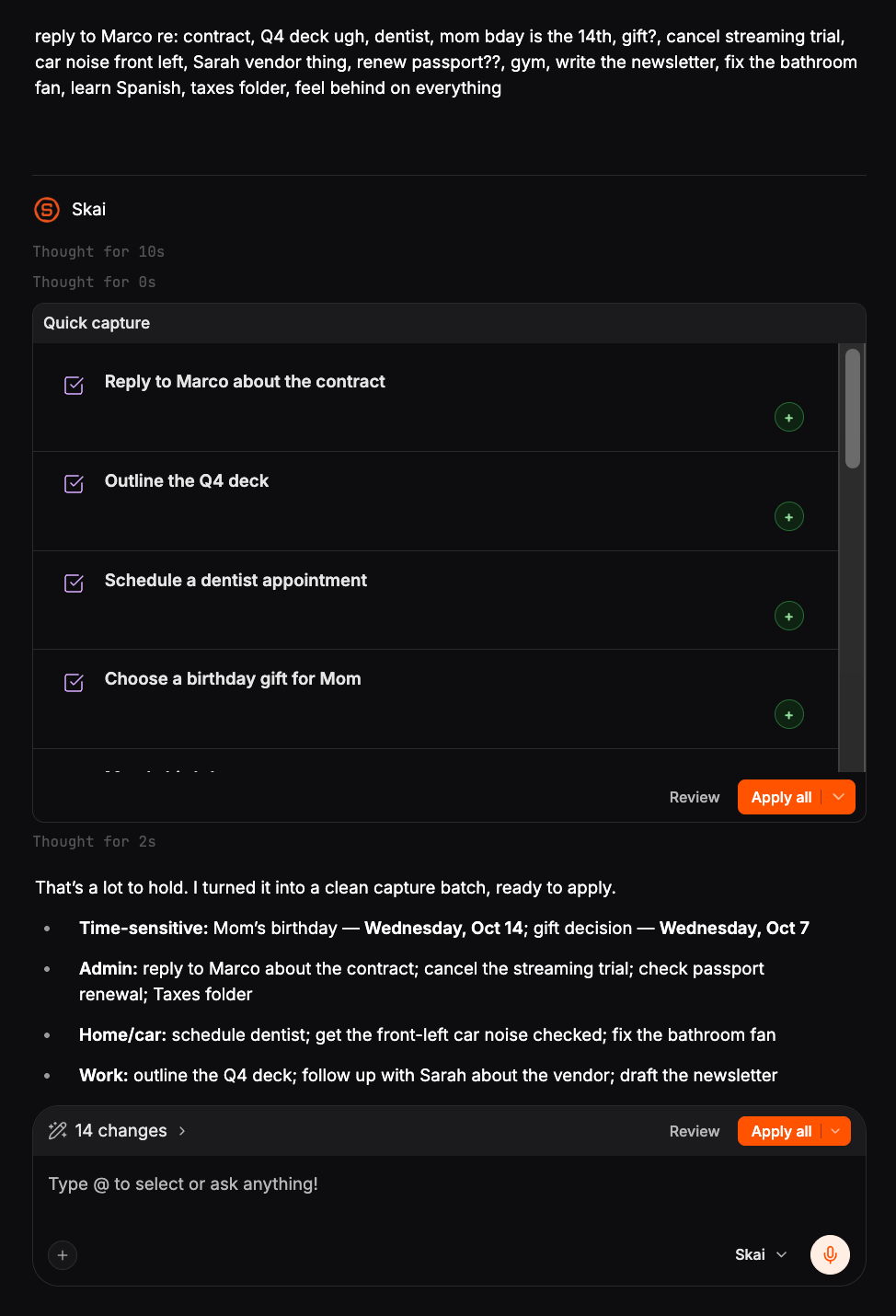
1 minute, start to finish. No sticky-note shuffling required.
Which AI tools work best for brain dumps?
You don't need anything fancy to start. But different tools fit different parts of the job.
General chatbots (ChatGPT, Claude, Gemini)
- Good for: trying the method tonight, free, flexible prompts, voice mode for rambly dumps
- Weak spot: the sorted list lives in a chat thread. You still have to copy it somewhere, and old dumps get buried
- Best if: you already have a task manager you like and just need the sorting step
AI personal assistants
This is where I've landed for my own weekly dumps. The friction in the chatbot approach is the copy-paste at the end: the dump is in one place, the sorted list is in another, and your calendar is in a third. That's three chances for things to fall through.
I use Saner.ai for this. You can dump into a note (typed or by voice), and its assistant pulls tasks out of it, suggests priorities, and puts things on a calendar timeline in the same app where your notes and email live. It also nudges you about stuff you forgot, which is useful when the whole reason you're brain dumping is that you forget stuff.
It's not the only option; my roundup of the best AI personal assistants covers others, and if you're an ADHD brain like me, the best AI assistants for ADHD list tests them specifically for scattered thinking.
Dedicated AI task managers
- Good for: people with lots of deadlines and projects who want auto-scheduling
- Weak spot: many expect clean input, so pair them with a chatbot or assistant for the messy sorting part
- See: my comparison of the best AI task managers
Quick rule: If you're brand new to this, start with a free chatbot for two weeks. If you find yourself doing the dump regularly and hating the copy-paste, move to an assistant that keeps capture, tasks, and calendar in one place.
New to AI tools in general? My guide to AI assistants for beginners is a gentler starting point.
4 prompts to steal if you use a general LLM

1. The nighttime quick sort
Sort this brain dump into three lists: Tomorrow (max 3 items), This Week, and Later. Rewrite each item as a clear next action. Don't add anything I didn't write.
2. The overwhelm reset
I'm overwhelmed. Here's everything on my mind. Tell me the single smallest action that would make me feel most relieved, and why. Then list everything else in order of deadline.
3. The meeting and email catch-all
Here's a dump of things people asked me for this week in meetings and emails. Pull out every commitment I made, who I made it to, and any deadline mentioned.
(For a full workflow on this one, see how I turn meeting notes into tasks with AI.)
4. The project unpacker
This item is too big: [item]. Break it into steps of 30 minutes or less, and tell me the very first physical action.
If that last one is your main struggle, my full walkthrough on how to break down a task with AI goes much deeper.
Common brain dump mistakes
Editing while dumping. The second you start tidying, your inner manager shows up and starts rejecting "silly" items. The silly items are often the ones keeping you awake. Dump first, judge later.
Asking AI to "organize" with no instructions. You'll get a beautiful, generic list that sorts things by vibes. Use a real prompt with categories and rules.
Letting the AI decide priorities alone without any context. It'll rank by whatever sounds urgent in the words you used. "URGENT reply to newsletter spam" will beat "call Mom." Always do the final cut yourself.
Dumping and never looking again. A dump with no follow-up is just a very long diary entry. The sorted list needs to land in a system you check daily.
Pasting sensitive info without thinking. Before you dump medical details, passwords, or client secrets into any AI tool, check its privacy settings and data retention policy. When in doubt, write "[client thing]" and keep the details offline.
Doing it only in crisis mode. A weekly dump prevents the 11:40 p.m. panic dump. Pair it with a weekly review with AI and it becomes a 20-minute habit instead of an emergency.
How often should you brain dump?
It depends on how noisy your head is. A rough guide:
- Daily (5 minutes): if you're juggling a lot, have ADHD, or wake up at night thinking about work
- Weekly (15 minutes): the sweet spot for most people, ideally Sunday evening or Friday afternoon
- On demand: whenever you notice you're stuck, snappy, or rereading the same email four times
My own rhythm: a full 15-minute dump every Sunday, plus a 2-minute voice ramble on busy weeknights. Then the AI sorts it and I plan the next day. If you want the daily planning part laid out properly, see how to plan your day with AI.
When a brain dump won't fix it
I want to be straight about this. A brain dump is a productivity tool. It helps with the load of too many open loops.
It won't fix:
- A workload that's genuinely too big. If your sorted list has 60 must-dos this week, the problem is capacity, and that's a conversation with your manager, not a prompt.
- Persistent anxiety, low mood, or sleep problems. If racing thoughts keep you up most nights or are affecting your day, talk to a doctor or a licensed mental health professional. A to-do list is not a treatment.
- Avoidance of one scary task. Sometimes the list is fine and you're just dodging one thing. Name it, shrink it to a 10-minute first step, and do that first.
FAQ
What is an AI brain dump?
An AI brain dump is when you write or speak every task and worry in your head without organizing it, then use an AI assistant to sort that raw input into clear next actions, groups, deadlines, and a "later" list.
What's the best AI for brain dumping?
For a free start, any major chatbot (ChatGPT, Claude, Gemini) with a good sorting prompt works. If you want the dump, tasks, and calendar in one place without copy-pasting, an AI personal assistant like Saner.ai is a better long-term fit.
Can I brain dump by voice?
Yes, and it's often faster. Record a voice note or use an AI's voice mode, then ask it to extract every task, commitment, and deadline from the transcript.
Does brain dumping help with sleep?
In one small sleep-lab study, young adults who wrote a specific to-do list for five minutes before bed fell asleep faster than those who wrote about completed tasks (Scullin et al., 2018). It's not a treatment for insomnia, but it's a cheap experiment.
How is a brain dump different from a to-do list?
A to-do list is organized and filtered. A brain dump is the unfiltered raw material that comes before it. AI helps you turn the second into the first.
Your action step for tonight
Don't bookmark this and forget it. Do this, today:
- Set a 5-minute timer and dump everything in your head. Typing or voice.
- Paste it into an AI with the sorting prompt from Step 2.
- Answer its questions, then cut ruthlessly.
- Pick three things for tomorrow and give each one a when and a where.
- Put those three somewhere you'll see them at the start of your day.
Then close the laptop. The dentist isn't going anywhere, and now neither is the reminder. 😌
Theo Keene tests AI productivity tools for a living and brain dumps every Sunday night, usually with a cup of tea going cold beside him.



