Best AI Email Assistants. I Tested +10 of them.

How I tested these AI assistants for email
Same process as everything else on this site. Real inbox, real backlog, minimum two weeks, no cherry-picked demo emails. I ran all five against my own Gmail and, for the ones that support it, an Outlook account I keep around specifically for testing this category. I did not get free access to any of these. I paid for what needed paying, same as you would.

1. Gemini in Gmail: best if you already live in Google Workspace
Price: Free with any Google account, more capable on Workspace Business Starter (~$7/user/month) and up, full feature set tied to a Google AI Pro or Ultra subscription.
Gemini's Gmail integration used to require a separate $19.99/month add-on. Not anymore. As of 2026 it's folded into every Workspace tier, which quietly makes it the best free option in this entire category.
You get thread summaries, "Help me write," suggested replies, and, if you're on AI Pro or Ultra, the ability to ask your inbox actual questions in plain English. Something like "what did we agree on with the Meridian contract." It pulls the answer from the thread instead of you scrolling through nine replies.
What it won't do: send, delete, archive, or otherwise act on your behalf. It's a writing and search layer sitting on top of Gmail, not an agent running your inbox while you're at lunch. If you want that, keep reading.
Good for: anyone on Google Workspace who wants real AI help without adding a subscription or a new app.
Skip it if: you're on Outlook (obviously)

or you want something that actually does things instead of just helping you write and find things.
2. Superhuman: best for pure speed at high volume
Price: Starter $30/user/month ($25 billed annually), Business $40/month ($33 annually).
Superhuman was a fast keyboard-driven email client before it was an AI company, and that heritage still shows. It's the fastest way to physically move through 150 emails a day I've tested.
The AI layer on top adds Auto Drafts (writes full follow-ups in your voice without being asked, Business tier only), Auto Labels that sort your inbox into categories like "response needed" and "waiting on" so you can triage by priority instead of chronology, and per-recipient tone matching that's sharper than I expected. A note I send to my accountant reads different from one I send to a friend. Superhuman picked up on that.
The catch is the price and the commitment. I liked it more than I expected to, and I still don't think it earns its price for anyone sending under 50 emails a day.
Good for: sales, recruiting, anyone whose whole job is answering email fast and well. Skip it if: your inbox isn't the bottleneck in your day. This is a tool for people whose inbox genuinely is.
3. Fyxer AI: best for drafts that sound like you, plus meetings
Price: Starter $30/month, Professional $50/month (25% off annually), 7-day free trial, no permanent free tier.
Fyxer's whole pitch is drafting replies that don't sound like a robot wearing your name, and it mostly delivers. It studies roughly your last 300 emails to learn your patterns, which is a smaller window than some competitors use, so early drafts can feel a little generic until it's had a few weeks with your actual writing. Give it that time and the editing gap shrinks fast.
The bonus feature that made this list is the built-in meeting notetaker. It joins your Google Meet, Teams, or Zoom calls and produces a summary with action items that can flow straight into a follow-up draft.
One thing worth knowing before you sign up: Fyxer drafts, it doesn't send. Everything still needs your review and your click. If you assumed it was a fully autonomous agent (a fair assumption, given how it's marketed in some places), that changes the math.
Good for: founders, recruiters, and agency people juggling a lot of threads who want believable drafts without switching email clients. Skip it if: you need it to actually send things while you're away. It won't.
4. Shortwave: best AI-native Gmail app with an actual free tier
Price: Free (limited), Pro $18/seat/month, Business $30, Premier $45, Max $120.
Shortwave rebuilds Gmail as its own app rather than sitting inside the Gmail interface. If you're Gmail-only, that rebuild is worth trying just for the free tier. Most of this category has none. The free plan includes basic AI intelligence and 90 days of searchable history, which is more than enough to figure out if the whole approach clicks for you before you spend a dollar.
Paid tiers add natural-language search across your whole inbox, voice-matched drafting, and, at Business and above, shared team threads. That starts pushing this from "personal tool" into "team inbox" territory.
Good for: Gmail-only users who want an AI-native experience and a real way to try before they buy. Skip it if: you're on Outlook at all. Shortwave doesn't support it, full stop.
5. Saner.ai: best if email is just one piece of a bigger mess
Price: Free tier, paid plans from roughly $8 to $12/month (annual billing), scaling up from there. Pricing varies a bit by source and billing cycle, so check Saner.ai's own pricing page before you commit to a plan.
Saner.ai doesn't treat your inbox as the thing to optimize. It treats your inbox as one of several places tasks hide, alongside your notes, your calendar, and whatever you dumped into a voice memo on the way to a meeting, and tries to surface the whole picture instead of a cleaner version of just the email part.
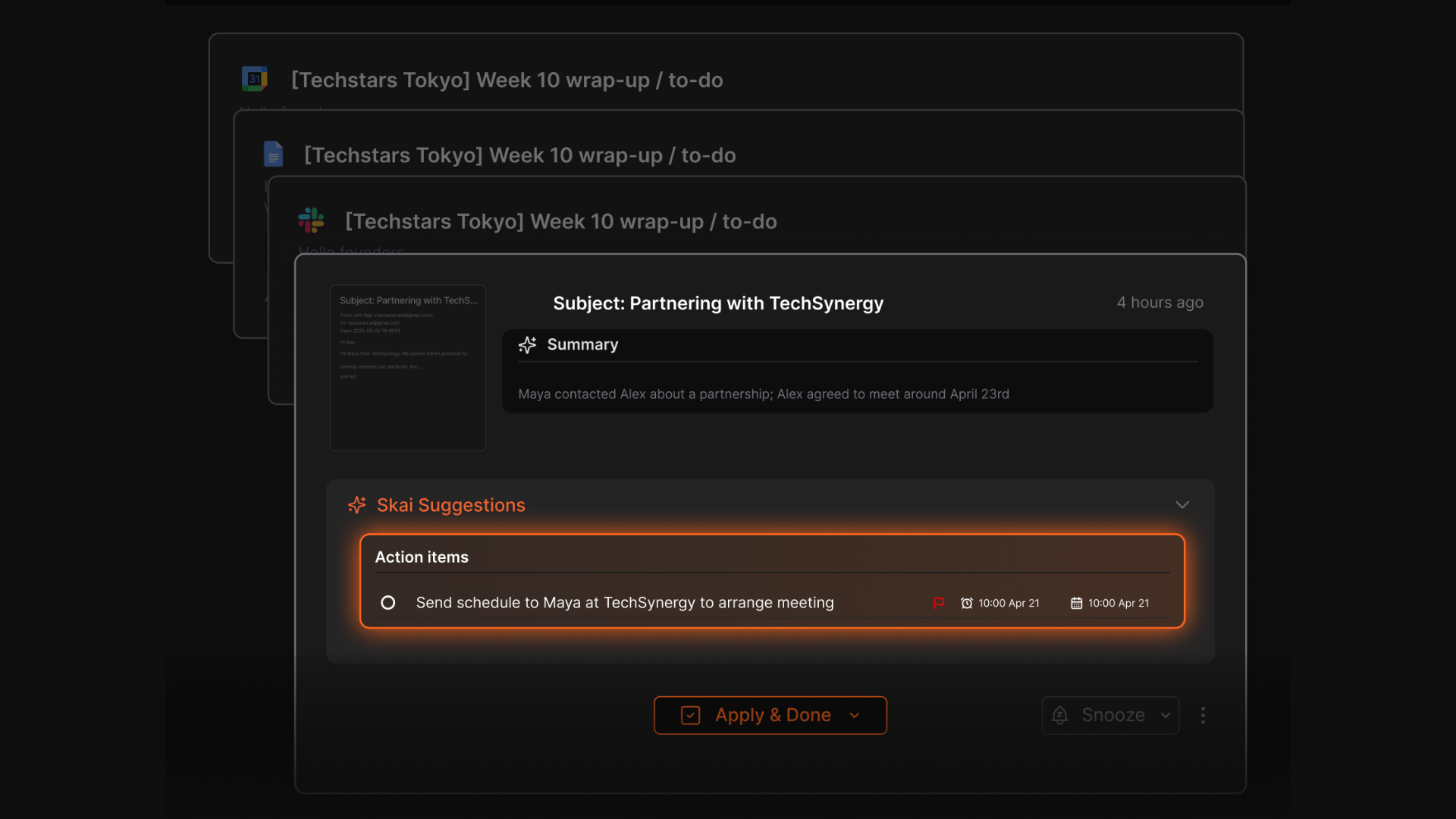
The feature that actually changed my week is the "chat to schedule" function. You tell it, in plain language, to move something. "Push my 2pm with Dana to Thursday afternoon, she emailed asking."
Add voice capture on top (I talk to it in the car, it transcribes and files the note) plus an AI inbox for Gmail that reads incoming messages and suggests next steps or spins up tasks on its own, and what you get is less "email tool" and more "the assistant checks your morning so you don't have to."
It's not perfect. The free tier's usage limits are tighter than the ones on this list with actual free plans (looking at you, Shortwave), and it's a younger product, so it doesn't have the polish of something that's been iterating on email specifically for a decade. If pure inbox speed is your only goal, Superhuman still wins that fight. If your actual problem is "my email, my calendar, and my to-do list are three different fires," this is the only tool on this list built to put them out at the same time.
Good for: anyone whose real problem isn't email volume, it's juggling email, calendar, and tasks as three separate systems that never talk to each other. Skip it if: you specifically want a faster inbox and nothing more. Grab Superhuman or Shortwave instead.
A few questions people actually ask before using one of these
Can any of these send email without me clicking send? Mostly no, and that surprises people. Fyxer drafts only. Superhuman's Auto Drafts still sit in your outbox waiting for a click. Gemini won't act on anything at all. It writes and searches, full stop. Saner.ai's inbox layer suggests next steps and creates tasks from your email rather than replying on your behalf. If a fully autonomous "reads and replies while you sleep" tool is what you actually want, that's a narrower, newer category than the one this article covers. Most of the good ones there are still working out the trust issues that come with letting AI hit send unsupervised.
Is it safe to connect my email to an AI tool? Read the privacy policy before you connect anything, not after. I know that's not exciting advice. It's the correct one. Look specifically at whether the tool reads message content or just headers and metadata (that distinction matters more than most marketing pages let on), whether it trains any model on your data, and how deletion actually works if you cancel. I'm not a security researcher and this isn't a substitute for reading the actual policy of whatever you sign up for.
Do I need to switch email clients to use these? No, for four of the five. Gemini, Fyxer, and Saner.ai all work on top of your existing Gmail or Outlook. Superhuman and Shortwave are the exceptions. They replace your client entirely, which is either a feature or a dealbreaker depending on how attached you are to the interface you already know.
What if I only get 20 emails a day? Honestly, you might not need any of these. Gmail's own free filters plus five minutes of triage in the morning covers a lot of low-volume inboxes fine. Save the money and put it toward whichever tool solves your actual bottleneck, which for a light inbox is probably not email at all.
So which AI assistant for email is suitable for you?
If I had to hand you a decision tree instead of five sections:
- On Google Workspace and haven't tried the AI features yet? Turn on Gemini before you spend a cent elsewhere.
- Drowning specifically in email volume, and email is your whole job? Superhuman.
- Want believable drafts and free meeting notes, on Outlook or Gmail? Fyxer.
- Gmail-only, want to try before you buy, care about search more than drafting? Shortwave.
- The actual problem isn't your inbox, it's that your inbox, calendar, and task list don't know about each other? Saner.ai.
— Theo